Step-by-Step Guide to Charity Registration Portal
Charity Registration Portal – Step-by-Step Functional & UI Documentation
1. Purpose of This Document
This document provides a complete step-by-step explanation of the Charity Registration Portal. It explains exactly what was implemented, why it was implemented, and how each screen works, including UI behavior, validations, navigation, and CRM field mapping. This document is written for functional reviewers, developers, and support teams.
2. Overall Charity Registration Flow
The charity registration process is divided into multiple guided steps. Users are taken through the process sequentially using a visual progress bar. Data is saved step-by-step to ensure no loss of information.
High-level steps:
- Home Page (Entry point)
- FAQ Page (Information only)
- Charity Registration Details
- Upload Charity Logo
- Bank Details & Final Submission
3. Home Page – Charity Portal Registration
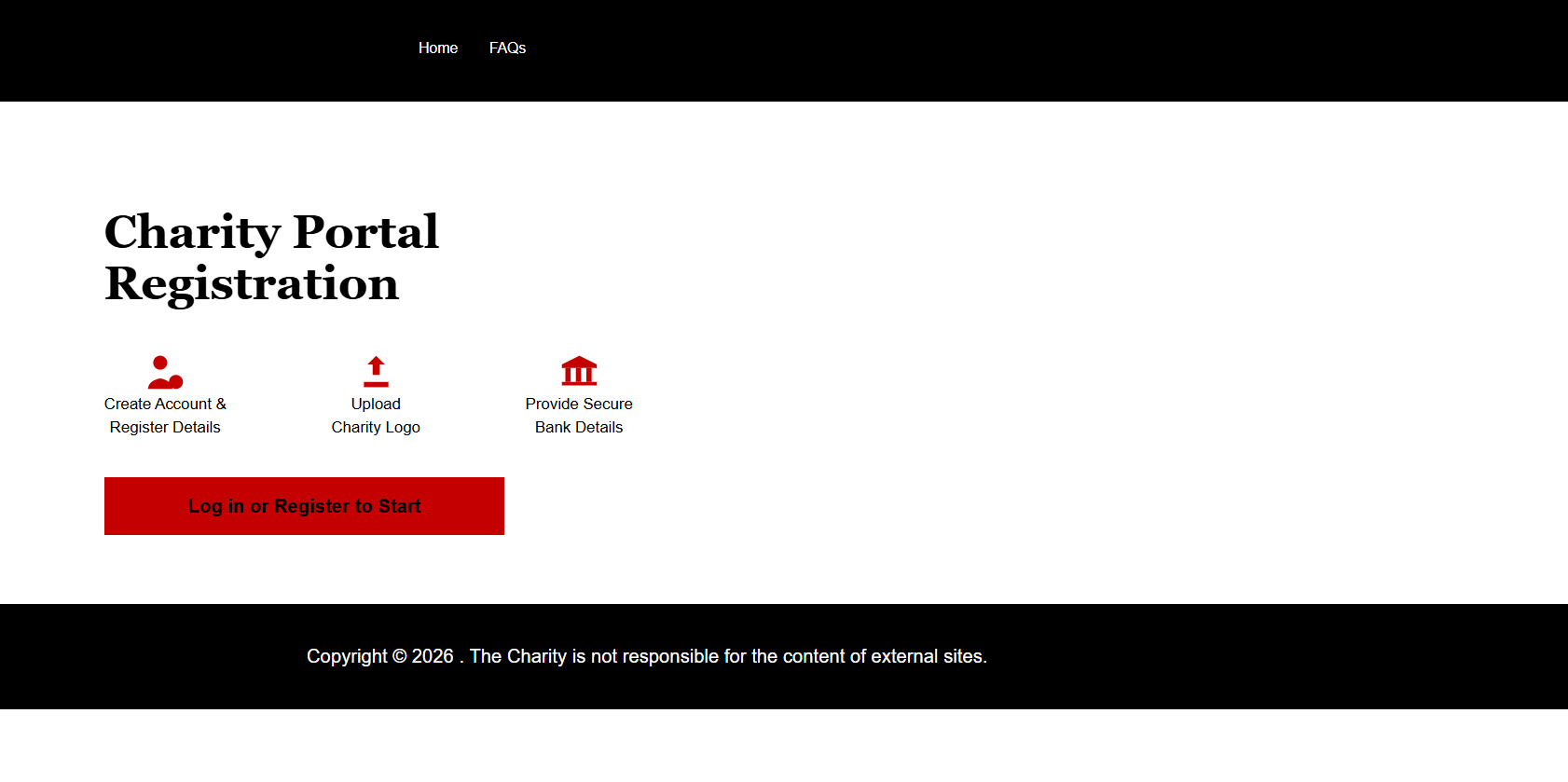
The Home page is the first screen a user sees when accessing the Charity Portal. It introduces the registration process and sets expectations.
What we implemented step-by-step:
- Custom header with BBC branding
- Clear title: 'Charity Portal Registration'
- Visual explanation of 3 main steps: Registration, Upload Logo, Bank Details
- 'Log in or Register to Start' button
When the user clicks the button, they are redirected to the authentication page. No CRM data is created at this stage.
Home Page – Charity – Full HTML, CSS & JavaScript Code
Below is the complete implementation used in the Home Page Charity. This code is provided for reference only and is not executed inside this blog.
<style>
        #mainContent, .wrapper-body, .page-copy, .container {
        max-width: 100% !important;
        padding: 0 !important;
    }

    body {
        font-family: Arial,Helvetica,sans-serif;
        background: #fff;
    }

    .page {
        padding: 80px 100px;
    }

    h1 {
        font-family: Georgia,"Times New Roman",serif;
        font-size: 44px;
        font-weight: 700;
        margin-bottom: 40px;
    }

    .steps {
        display: flex;
        gap: 100px;
        margin-bottom: 50px;
    }

    .step {
        text-align: center;
        font-size: 15px;
    }

    .step-icon {
        cursor: pointer;
    }

        .step-icon svg {
            width: 40px;
            height: 40px;
            fill: #c40000;
        }

        .step-icon:hover svg {
            opacity: .8;
        }

    .start-btn a {
        background: #c40000;
        color: #fff;
        padding: 18px 80px;
        font-size: 18px;
        text-decoration: none;
        font-weight: 600;
        cursor: pointer;
    }
</style>

<div class="bbc-page">
    <div class="page">

        <h1>Charity Portal<br>Registration</h1>

        <div class="steps">

            <!-- STEP 1 -->
            <div class="step">
                <div class="step-icon" onclick="goStep1()">
                    <svg viewBox="0 0 24 24">
                        <circle cx="9" cy="7" r="4" />
                        <path d="M2 22c0-4 5-6 7-6s7 2 7 6" />
                        <circle cx="18" cy="18" r="4" />
                        <path d="M18 16v4M16 18h4" />
                    </svg>
                </div>
                Create Account &<br>Register Details
            </div>

            <!-- STEP 2 -->
            <div class="step">
                <div class="step-icon" onclick="goStep2()">
                    <svg viewBox="0 0 24 24">
                        <path d="M12 3l5 5h-3v6h-4V8H7z" />
                        <path d="M5 18h14v3H5z" />
                    </svg>
                </div>
                Upload<br>Charity Logo
            </div>

            <!-- STEP 3 -->
            <div class="step">
                <div class="step-icon" onclick="goStep3()">
                    <svg viewBox="0 0 24 24">
                        <path d="M12 3l10 5v2H2V8z" />
                        <rect x="4" y="10" width="3" height="8" />
                        <rect x="10" y="10" width="3" height="8" />
                        <rect x="16" y="10" width="3" height="8" />
                        <rect x="2" y="18" width="20" height="2" />
                    </svg>
                </div>
                Provide Secure<br>Bank Details
            </div>

        </div>

        <div class="start-btn">
            <a onclick="goToSignup()">Log in or Register to Start</a>
        </div>

    </div>
</div>


<script>
    /* =====================================================
   POWER PAGES SAFE AJAX (REQUIRED)
===================================================== */
var webapi = webapi || {};

webapi.safeAjax = function (options) {
  var deferred = $.Deferred();

  shell.getTokenDeferred().done(function (token) {
    options.headers = options.headers || {};
    options.headers["__RequestVerificationToken"] = token;

    $.ajax(options)
      .done(function (data, textStatus, xhr) {
        deferred.resolve(data, textStatus, xhr);
      })
      .fail(function (xhr) {
        deferred.reject(xhr);
      });
  });

  return deferred.promise();
};

/* =====================================================
   LOGIN CHECK
===================================================== */
function isLoggedIn() {
  return "{{ user.id }}" !== "";
}

/* =====================================================
   GET CHARITY FOR LOGGED-IN CONTACT
===================================================== */
function getCharityForUser(successCallback, failCallback) {

  var contactId = "{{ user.id }}";
  if (!contactId) {
    failCallback();
    return;
  }

  contactId = contactId.replace(/[{}]/g, "");

  webapi.safeAjax({
    type: "GET",
    url:
      "/_api/crm_gmrcharities" +
      "?$select=crm_gmrcharityid,crm_name" +
      "&$filter=_crm_portaluser_value eq " + contactId
  })
  .done(function (result) {

    if (result.value && result.value.length > 0) {
      successCallback(result.value[0]);
    } else {
      failCallback();
    }
  })
  .fail(function () {
    failCallback();
  });
}

/* =====================================================
   STEP 1 – CHARITY REGISTRATION
===================================================== */
function goStep1() {

  if (!isLoggedIn()) {
    window.location.href =
      "/signin?returnurl=/Charity-Registration-Details/";
    return;
  }

  window.location.href = "/Charity-Registration-Details/";
}

/* =====================================================
   STEP 2 – UPLOAD LOGO
===================================================== */
function goStep2() {

  if (!isLoggedIn()) {
    window.location.href =
      "/signin?returnurl=/Charity-Registration-Details/";
    return;
  }

  getCharityForUser(
    function (charity) {

      // Charity exists + name completed
      if (charity.crm_name && charity.crm_name.trim() !== "") {
        window.location.href = "/Upload-Logo/";
      } else {
        alert("Please complete Charity Registration first");
        window.location.href = "/Charity-Registration-Details/";
      }
    },
    function () {
      alert("Please complete Charity Registration first");
      window.location.href = "/Charity-Registration-Details/";
    }
  );
}

/* =====================================================
   STEP 3 – BANK DETAILS
===================================================== */
function goStep3() {

  if (!isLoggedIn()) {
    window.location.href =
      "/signin?returnurl=/Charity-Registration-Details/";
    return;
  }

  getCharityForUser(
    function (charity) {

      // Charity exists + name completed
      if (charity.crm_name && charity.crm_name.trim() !== "") {
        window.location.href = "/Bank-Details/";
      } else {
        alert("Please complete Charity Registration first");
        window.location.href = "/Charity-Registration-Details/";
      }
    },
    function () {
      alert("Please complete Charity Registration first");
      window.location.href = "/Charity-Registration-Details/";
    }
  );
}

/* =====================================================
   MAIN CTA – SIGN IN / SIGN UP
===================================================== */
function goToSignup() {
  window.location.href =
    "/signin?returnurl=/";
}
</script>
4. FAQ Page – Frequently Asked Questions
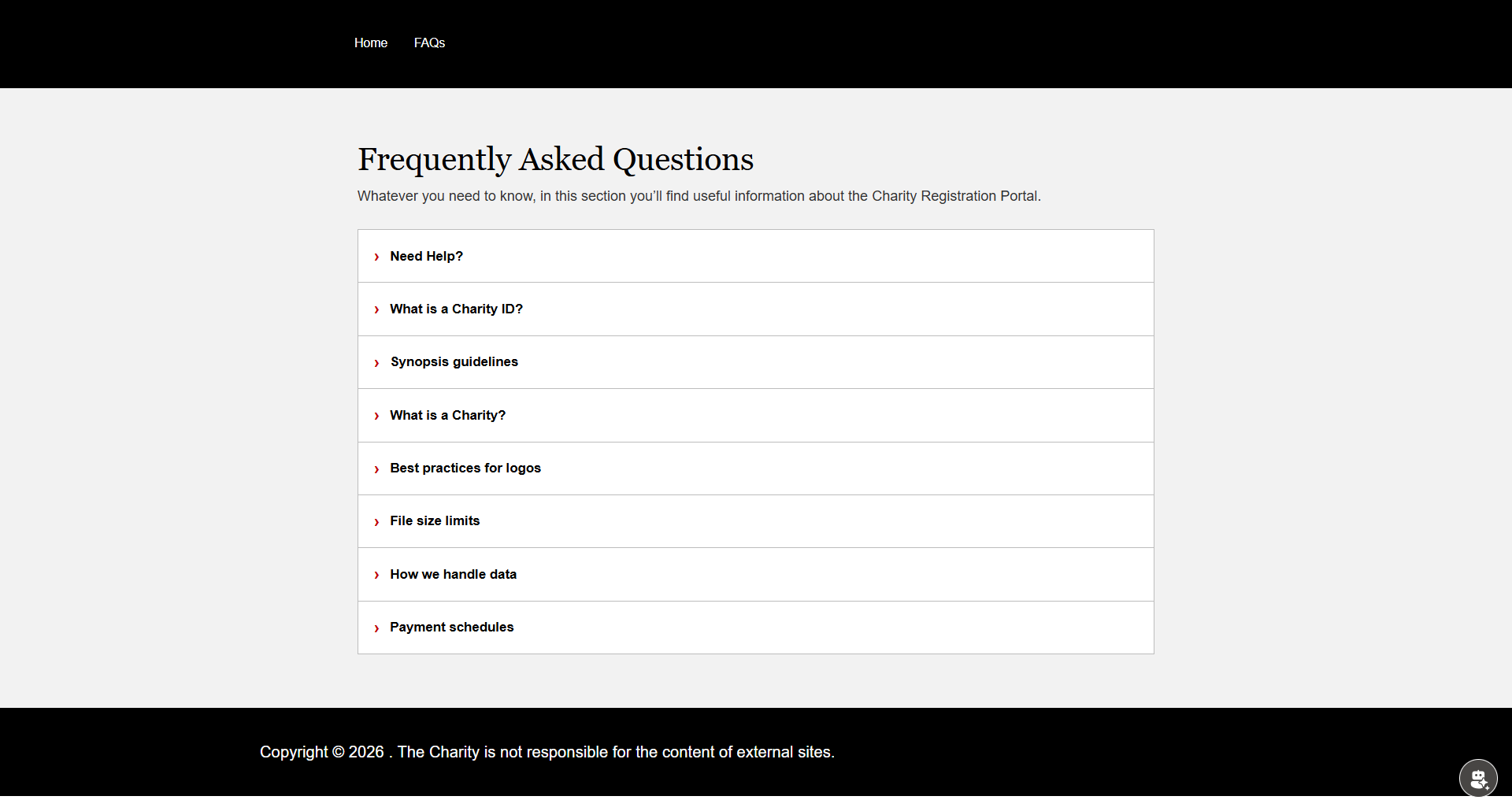
The FAQ page provides supporting information to users before or during registration. This page is informational only and does not interact with CRM.
What we implemented:
- Static FAQ questions and answers
- Expand / collapse behavior for readability
- Consistent header and footer
5. Authentication Page
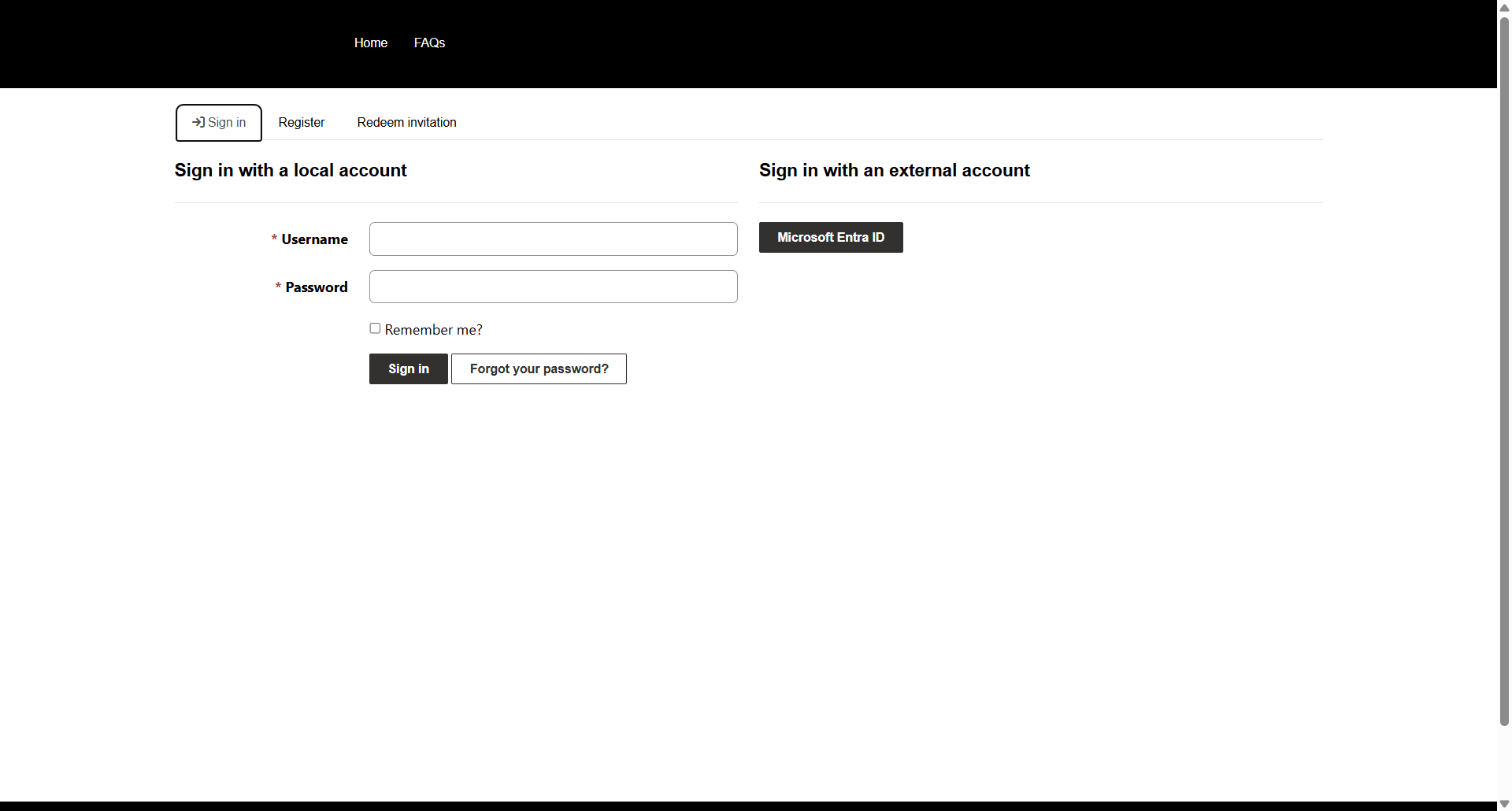
Users must authenticate before registering a charity. Authentication ensures that every charity record is linked to a verified user.
Authentication options:
- Local account sign-in (username/password)
- External account sign-in using Microsoft Entra ID
After successful login, the user is redirected automatically to the Charity Registration Home page. User click the Create Account & Register Details It will navigate to Charity Registration Details Page.
6. Charity Registration Details Page – Step 1
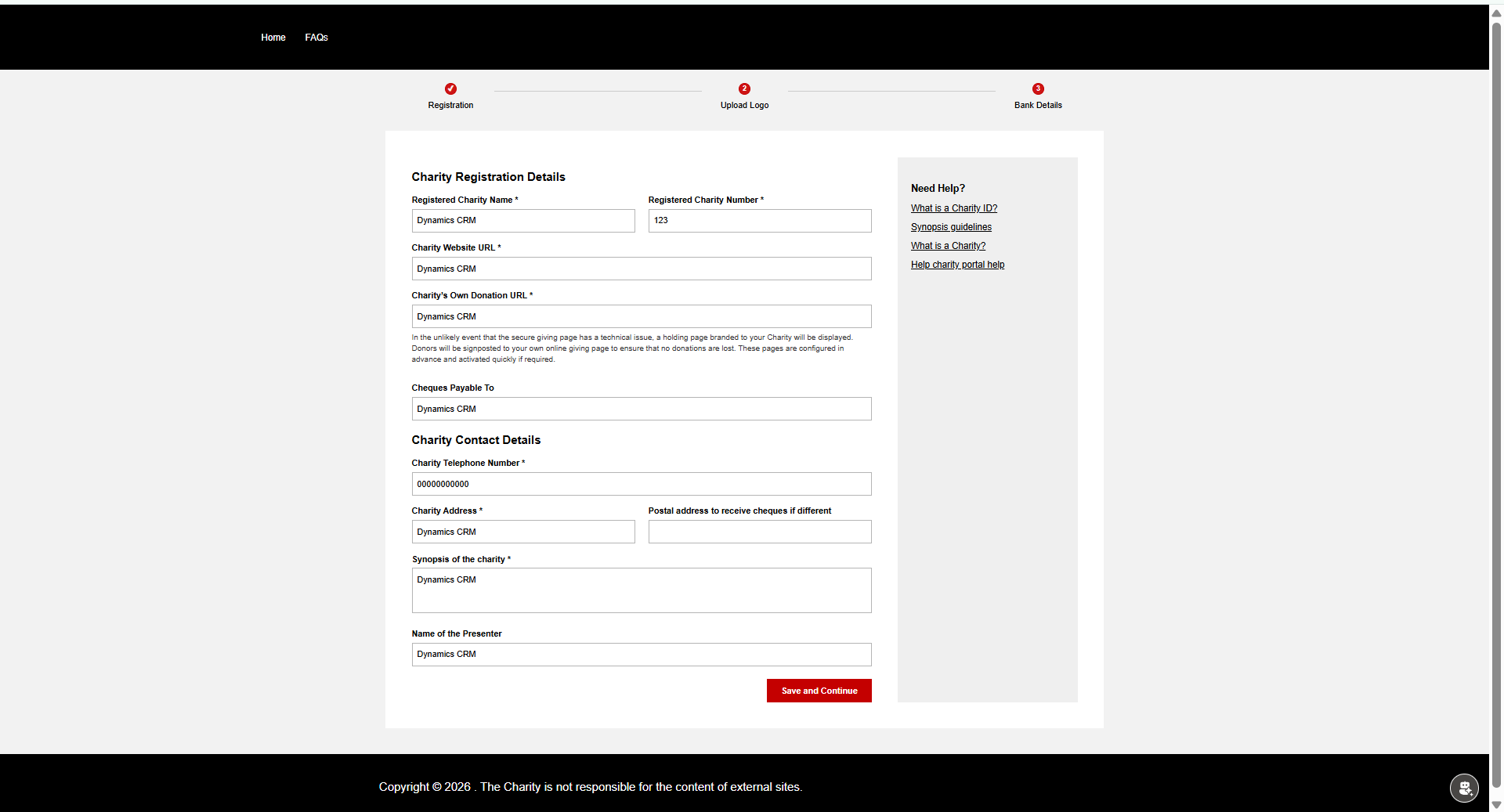
This page captures the core information about the charity. It is the most important step in the registration process.
Step-by-step implementation:
- Designed a custom form using HTML and CSS.
- Added mandatory fields such as Charity Name, Charity Number, Website URL, Donation URL.
- Added contact and address details.
- Added a synopsis text area for charity description.
- Implemented client-side validation for required fields.
- On clicking 'Save and Continue', data is saved into the Charity table in Dataverse.
- The Charity record ID is stored for use in the next steps.
At this stage, the charity record is created or updated and linked to the logged-in user.
Charity Registration – Full HTML, CSS & JavaScript Code
Below is the complete implementation used in the Charity Registration Details. This code is provided for reference only and is not executed inside this blog.
<style>
    /* ================= RESET ================= */
#mainContent, .wrapper-body, .page-copy, .container {
    max-width: 100% !important;
    padding: 0 !important;
}

body {
    font-family: Arial, Helvetica, sans-serif;
    background: #f2f2f2;
}

/* ================= PROGRESS BAR ================= */
.bbc-progress-container {
    max-width: 1100px;
    margin: 20px auto 30px auto;
    padding: 0 40px;
}

.bbc-progress-wrapper {
    display: flex;
    align-items: center;
}

.bbc-progress-step {
    display: flex;
    flex-direction: column;
    align-items: center;
    gap: 6px;
    font-size: 13px;
    min-width: 120px;
}

.bbc-circle {
    width: 18px;
    height: 18px;
    border-radius: 50%;
    border: 2px solid #c40000;
    display: flex;
    align-items: center;
    justify-content: center;
    font-size: 11px;
    font-weight: bold;
    color: #c40000;
    background: #fff;
}

.bbc-progress-step.active .bbc-circle {
    background: #c40000;
    color: #fff;
}

.bbc-progress-line {
    flex: 1;
    height: 2px;
    background: #ccc;
    margin: 0 6px 18px 6px;
}

/* ================= PAGE ================= */
.bbc-page {
    max-width: 1100px;
    margin: 0 auto 40px auto;
    background: #fff;
    padding: 40px;
    display: flex;
    gap: 40px;
}

/* ================= LEFT FORM ================= */
.bbc-left {
    flex: 3;
}

    .bbc-left h2 {
        font-size: 18px;
        font-weight: bold;
        margin-bottom: 15px;
    }

/* ================= FORM GRID ================= */
.bbc-row {
    display: flex;
    gap: 20px;
    margin-bottom: 14px;
}

.bbc-col {
    width: 100%;
}

.bbc-label {
    font-size: 13px;
    font-weight: bold;
    display: block;
    margin-bottom: 4px;
}

.bbc-input, .bbc-textarea {
    width: 100%;
    padding: 7px;
    font-size: 13px;
    border: 1px solid #b5b5b5;
    box-sizing: border-box;
}

.bbc-textarea {
    resize: none;
    height: 70px;
}

/* ================= BUTTON ================= */
.bbc-btn-row {
    display: flex;
    justify-content: flex-end;
    margin-top: 20px;
}

.bbc-btn-submit {
    background: #c40000;
    color: #fff;
    border: none;
    padding: 8px 22px;
    font-size: 13px;
    font-weight: bold;
    cursor: pointer;
}

/* ================= RIGHT BOX ================= */
.bbc-side-box {
    flex: 1;
    background: #efefef;
    padding: 20px;
    font-size: 13px;
}

    .bbc-side-box h3 {
        font-size: 15px;
        margin-bottom: 10px;
    }

    .bbc-side-box a {
        display: block;
        color: #000;
        text-decoration: underline;
        margin-bottom: 8px;
    }

.bbc-helper-text {
    font-size: 12px;
    color: #333;
    line-height: 1.4;
    margin-top: 6px;
    margin-bottom: 12px;
}
/* ===== INLINE ERROR ===== */
.bbc-error {
    color: #c40000;
    font-size: 12px;
    margin-top: 4px;
    display: none;
}

.bbc-input.error,
.bbc-textarea.error {
    border-color: #c40000;
}
</style>

<div class="bbc-page">

<!-- ================= PROGRESS BAR ================= -->
<div class="bbc-progress-container">
    <div class="bbc-progress-wrapper">

        <div class="bbc-progress-step active">
            <span class="bbc-circle">1</span>
            <span>Registration</span>
        </div>

        <div class="bbc-progress-line"></div>

        <div class="bbc-progress-step">
            <span class="bbc-circle">2</span>
            <span>Upload Logo</span>
        </div>

        <div class="bbc-progress-line"></div>

        <div class="bbc-progress-step">
            <span class="bbc-circle">3</span>
            <span>Bank Details</span>
        </div>

    </div>
</div>

<!-- ================= PAGE BODY ================= -->
<div class="bbc-page">

    <!-- LEFT -->
    <div class="bbc-left">

        <h2>Charity Registration Details</h2>

        <div class="bbc-row">
            <div class="bbc-col">
                <label class="bbc-label">Registered Charity Name *</label>
                <input id="crm_name" class="bbc-input">
                <div class="bbc-error" id="err_crm_name">This field is required</div>
            </div>
            <div class="bbc-col">
                <label class="bbc-label">Registered Charity Number *</label>
                <input id="crm_charitynumber" class="bbc-input">
                <div class="bbc-error" id="err_crm_charitynumber">This field is required</div>
            </div>
        </div>

        <div class="bbc-row">
            <div class="bbc-col">
                <label class="bbc-label">Charity Website URL *</label>
                <input id="crm_website" class="bbc-input">
                <div class="bbc-error" id="err_crm_website">This field is required</div>
            </div>
        </div>

        <div class="bbc-row">
            <div class="bbc-col">
                <label class="bbc-label">Charity’s Own Donation URL *</label>
                <input id="crm_donationurl" class="bbc-input">
                <div class="bbc-error" id="err_crm_donationurl">This field is required</div>

                <div class="bbc-helper-text">
                    In the unlikely event that the secure giving page has a technical issue,
                    a holding page branded to your Charity will be displayed.
                </div>
            </div>
        </div>

        <div class="bbc-btn-row">
            <button id="saveRegistration" class="bbc-btn-submit">
                Save and Continue
            </button>
        </div>

    </div>

    <!-- RIGHT -->
    <div class="bbc-side-box">
        <h3>Need Help?</h3>
        <a href="#">What is a Charity ID?</a>
        <a href="#">Synopsis guidelines</a>
    </div>

</div>

<script>
   /* ================= GLOBAL ================= */
var loggedInContactId = "{{ user.id }}";   // Portal Contact ID
var charityId = null;

/* ================= SAFE AJAX ================= */
window.safeAjax = function (options) {
  var deferred = $.Deferred();
  shell.getTokenDeferred().done(function (token) {
    options.headers = options.headers || {};
    options.headers["__RequestVerificationToken"] = token;
    $.ajax(options).done(deferred.resolve).fail(deferred.reject);
  });
  return deferred.promise();
};

/* ================= DOCUMENT READY ================= */
$(document).ready(function () {

  if (!loggedInContactId) {
    console.log("User not logged in");
    return;
  }

  loadCharityForLoggedInUser();

  $("#saveRegistration").on("click", function (e) {
    e.preventDefault();
    saveOrUpdateCharity();
  });

});

function isRegistrationCompleted() {

  const requiredFields = [
    "#crm_name",
    "#crm_charitynumber",
    "#crm_website",
    "#crm_donationurl",
    "#crm_phone",
    "#crm_address",
    "#crm_synopsis"
  ];

  let completed = true;

  requiredFields.forEach(function (selector) {
    const el = $(selector);
    if (!el.val() || !el.val().trim()) {
      completed = false;
      el.addClass("error");
      $("#err_" + el.attr("id")).show();
    } else {
      el.removeClass("error");
      $("#err_" + el.attr("id")).hide();
    }
  });

  return completed;
}


/* ================= LOAD CHARITY ================= */
function loadCharityForLoggedInUser() {

  var url =
    "/_api/crm_gmrcharities" +
    "?$select=crm_name,crm_registeredcharitynumber,crm_charitywebsiteurl," +
    "crm_charitydonationurl,crm_chequespayableto,crm_charitycontactphone," +
    "crm_charityaddress,crm_synopsis,crm_presentername,crm_gmrcharityid" +
    "&$filter=_crm_portaluser_value eq " + loggedInContactId;

  safeAjax({
    type: "GET",
    url: url,
    success: function (res) {

      if (res.value && res.value.length > 0) {
        var charity = res.value[0];
        charityId = charity.crm_gmrcharityid;

        $("#crm_name").val(charity.crm_name);
        $("#crm_charitynumber").val(charity.crm_registeredcharitynumber);
        $("#crm_website").val(charity.crm_charitywebsiteurl);
        $("#crm_donationurl").val(charity.crm_charitydonationurl);
        $("#crm_cheques").val(charity.crm_chequespayableto);
        $("#crm_phone").val(charity.crm_charitycontactphone);
        $("#crm_address").val(charity.crm_charityaddress);
        $("#crm_synopsis").val(charity.crm_synopsis);
        $("#crm_presenter").val(charity.crm_presentername);

          updateProgressBar(); // ✅ ADD THIS


        console.log("Existing charity loaded:", charityId);
      }
    },
    error: function (xhr) {
      console.error("Failed to load charity", xhr.responseText);
    }
  });
}

/* ================= SAVE OR UPDATE ================= */
function saveOrUpdateCharity() {

  const registrationCompleted = isRegistrationCompleted();

  if (!registrationCompleted) {
    scrollToFirstError();
    return;
  }

  var record = {
    crm_name: $("#crm_name").val(),
    crm_registeredcharitynumber: $("#crm_charitynumber").val(),
    crm_charitywebsiteurl: $("#crm_website").val(),
    crm_charitydonationurl: $("#crm_donationurl").val(),
    crm_chequespayableto: $("#crm_cheques").val(),
    crm_charitycontactphone: $("#crm_phone").val(),
    crm_charityaddress: $("#crm_address").val(),
    crm_synopsis: $("#crm_synopsis").val(),
    crm_presentername: $("#crm_presenter").val(),

    // ✅ KEY FIELD
    crm_registrationcompleted: true
  };

  // Bind portal user ONLY on create
  if (!charityId) {
    record["crm_PortalUser@odata.bind"] =
      "/contacts(" + loggedInContactId + ")";
  }

  safeAjax({
    type: charityId ? "PATCH" : "POST",
    url: charityId
      ? "/_api/crm_gmrcharities(" + charityId + ")"
      : "/_api/crm_gmrcharities",
    contentType: "application/json",
    data: JSON.stringify(record),
    success: function (data, textStatus, xhr) {

      if (!charityId) {
        charityId = xhr.getResponseHeader("entityid");
      }

      updateProgressBar(); // ✔ show tick
      window.location.href = "/upload-logo/?id=" + charityId;
    },
    error: function (xhr) {
      console.error(xhr.status, xhr.responseText);
      alert("Failed to save registration");
    }
  });
}


function updateProgressBar() {
  if (charityId) {
    $("#step-registration").removeClass("active").addClass("done");
    $("#circle-registration").html("✔");
  } else {
    $("#circle-registration").html("1");
  }
}

function scrollToFirstError() {
  const firstError = document.querySelector(".bbc-input.error, .bbc-textarea.error");
  if (firstError) {
    firstError.scrollIntoView({ behavior: "smooth", block: "center" });
  }
}

</script>
7. Upload Charity Logo – Step 2
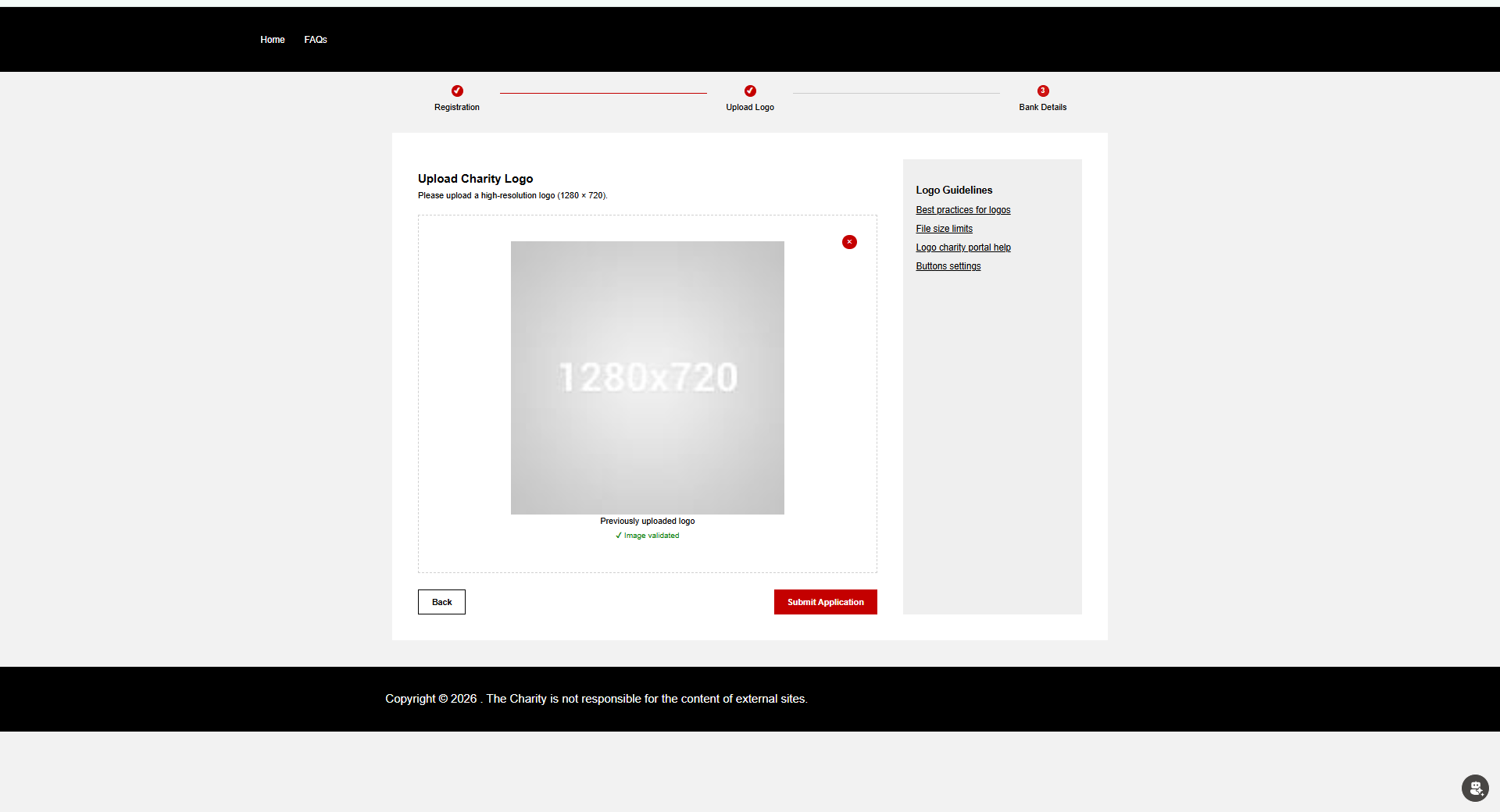
This page allows the charity to upload an official logo. The logo is stored securely in the Charity record.
Step-by-step implementation:
- Added file upload control supporting image formats.
- Applied file size and resolution validation.
- Displayed image preview after upload.
- Converted image to Base64 format.
- Uploaded the file to the Charity Logo column in Dataverse.
- Enabled navigation to the next step only after successful upload.
Upload Charity Logo – Full HTML, CSS & JavaScript Code
Below is the complete implementation used in the Upload Charity Logo Portal. This code is provided for reference only and is not executed inside this blog.
<style>
       /* ================= RESET ================= */
   #mainContent, .wrapper-body, .page-copy, .container {
       max-width: 100% !important;
       padding: 0 !important;
   }

   body {
       font-family: Arial, Helvetica, sans-serif;
       background: #f2f2f2;
   }

   /* ================= PROGRESS BAR ================= */
   .bbc-progress-container {
       max-width: 1100px;
       margin: 20px auto 30px auto;
       padding: 0 40px;
   }

   .bbc-progress-wrapper {
       display: flex;
       align-items: center;
   }

   .bbc-progress-step {
       display: flex;
       flex-direction: column;
       align-items: center;
       gap: 6px;
       font-size: 13px;
       min-width: 120px;
   }

   .bbc-circle {
       width: 18px;
       height: 18px;
       border-radius: 50%;
       border: 2px solid #c40000;
       display: flex;
       align-items: center;
       justify-content: center;
       font-size: 11px;
       font-weight: bold;
       //color: #c40000;
       background: #fff;
       color: #fff;
       background: #ce1515;
   }

   .bbc-progress-step.done .bbc-circle, .bbc-progress-step.active .bbc-circle {
       background: #c40000;
       color: #fff;
   }

   .bbc-progress-line {
       flex: 1;
       height: 2px;
       background: #ccc;
       margin: 0 6px 18px 6px;
   }

       .bbc-progress-line.done {
           background: #c40000;
       }

   /* ================= PAGE ================= */
   .bbc-page {
       max-width: 1100px;
       margin: 0 auto 40px auto;
       background: #fff;
       padding: 40px;
       display: flex;
       gap: 40px;
   }

   /* ================= LEFT ================= */
   .bbc-left {
       flex: 3;
   }

       .bbc-left h2 {
           font-size: 18px;
           font-weight: bold;
           margin-bottom: 5px;
       }

   .bbc-desc {
       font-size: 13px;
       margin-bottom: 20px;
   }

   /* ================= UPLOAD BOX ================= */
   .bbc-upload-box {
       border: 2px dashed #cfcfcf;
       padding: 40px;
       text-align: center;
       font-size: 13px;
   }

   .bbc-upload-icon {
       font-size: 42px;
       margin-bottom: 10px;
   }

   /* ===== PREVIEW ===== */
   #previewBox {
       width: 100%;
       text-align: center;
       position: relative;
   }

   #logoPreview {
       width: 100%;
       max-width: 900px;
       height: auto;
       max-height: 420px;
       object-fit: contain;
       display: block;
       margin: 0 auto;
   }

   .remove-btn {
       position: absolute;
       top: -10px;
       right: -10px;
       background: #c40000;
       color: #fff;
       border-radius: 50%;
       width: 22px;
       height: 22px;
       font-size: 14px;
       cursor: pointer;
       line-height: 22px;
       border: none;
   }

   .success-text {
       font-size: 12px;
       color: green;
       margin-top: 4px;
   }

   .bbc-error {
       color: #c40000;
       font-size: 12px;
       margin-top: 8px;
   }

   /* ================= BUTTONS ================= */
   .bbc-btn-row {
       display: flex;
       justify-content: space-between;
       margin-top: 25px;
   }

   .bbc-btn {
       padding: 8px 20px;
       font-size: 13px;
       font-weight: bold;
       cursor: pointer;
   }

   .bbc-btn-back {
       background: #fff;
       border: 1px solid #000;
   }

   .bbc-btn-submit {
       background: #c40000;
       color: #fff;
       border: none;
   }

   /* ================= RIGHT BOX ================= */
   .bbc-side-box {
       flex: 1;
       background: #efefef;
       padding: 20px;
       font-size: 13px;
   }

       .bbc-side-box h3 {
           font-size: 15px;
           margin-bottom: 10px;
       }

       .bbc-side-box a {
           display: block;
           color: #000;
           text-decoration: underline;
           margin-bottom: 8px;
       }
</style>

<div class="bbc-page">

    <!-- ================= PROGRESS BAR ================= -->
    <div class="bbc-progress-container">
        <div class="bbc-progress-wrapper">

            <div class="bbc-progress-step done">
                <span class="bbc-circle">✔</span>
                <span>Registration</span>
            </div>

            <div class="bbc-progress-line done"></div>

            <div class="bbc-progress-step active">
                <span class="bbc-circle">2</span>
                <span>Upload Logo</span>
            </div>

            <div class="bbc-progress-line"></div>

            <div class="bbc-progress-step">
                <span class="bbc-circle">3</span>
                <span>Bank Details</span>
            </div>

        </div>
    </div>

    <!-- ================= PAGE BODY ================= -->
    <div class="bbc-page">

        <!-- LEFT -->
        <div class="bbc-left">

            <h2>Upload Charity Logo</h2>
            <div class="bbc-desc">Please upload a high-resolution logo (1280 × 720).</div>

            <div class="bbc-upload-box">

                <!-- UPLOAD -->
                <div id="uploadPlaceholder">
                    <div class="bbc-upload-icon">☁️</div>
                    <b>Modern drag-and-drop file upload</b><br><br>
                    Drag or use drag-and-drop file upload <b>here.</b><br><br>
                    <input type="file" id="logoFile" accept="image/png,image/jpeg" hidden>
                    <button class="bbc-btn" onclick="logoFile.click()">Choose File</button><br><br>
                    File format: JPG, PNG.<br>Max size: 200MB
                </div>

                <!-- PREVIEW -->
                <div id="previewBox" style="display:none;">
                    <span class="remove-btn" onclick="removeImage()">×</span>
                    <img id="logoPreview">
                    <div class="file-name" id="fileName"></div>
                    <div class="success-text">✔ Image validated</div>
                </div>

                <!-- INLINE ERROR -->
                <div id="errorBox" class="bbc-error"></div>

            </div>

            <div class="bbc-btn-row">
                <button class="bbc-btn bbc-btn-back" onclick="goBack()">Back</button>
                <button id="submitLogo" class="bbc-btn bbc-btn-submit">Submit Application</button>
            </div>

        </div>

        <!-- RIGHT -->
        <div class="bbc-side-box">
            <h3><strong>Logo Guidelines</strong></h3>
            <a href="/FAQs/#faq-logo-best-practices">Best practices for logos</a>
            <a href="/FAQs/#faq-logo-size">File size limits</a>
            <a href="/FAQs/#faq-logo-help">Logo charity portal help</a>
            <a href="/FAQs/#faq-button-settings">Buttons settings</a>
        </div>

    </div>

    <!-- USER CONTEXT SCRIPT (DISPLAY ONLY) -->
    <script>
        // Example:
        // var loggedInContactId = "{{ user.id }}";
    </script>

</div>

<script>
     /* ================= SAFE AJAX ================= */
 window.safeAjax = function (options) {
     var deferred = $.Deferred();
     shell.getTokenDeferred().done(function (token) {
         options.headers = options.headers || {};
         options.headers["__RequestVerificationToken"] = token;
         $.ajax(options).done(deferred.resolve).fail(deferred.reject);
     });
     return deferred.promise();
 };

 /* ================= GLOBALS ================= */
 let charityId = null;
 let validatedFile = null;
 let logoRemoved = false;
 let hasExistingLogo = false;

 /* ================= DOCUMENT READY ================= */
 $(document).ready(function () {
     if (!loggedInContactId) {
         showError("User not logged in");
         return;
     }
     addLoader();
     fetchCharityByContact();
     $("#logoFile").on("change", handleImageSelect);
     $("#submitLogo").on("click", function (e) {
         e.preventDefault();
         submitLogo();
     });
 });

 /* ================= STEP-2 PROGRESS HELPERS ================= */
 function setUploadStepTick() {
     $(".bbc-progress-step").eq(1).addClass("done");
     $(".bbc-progress-step").eq(1).find(".bbc-circle").text("✔");
     $(".bbc-progress-line").eq(0).addClass("done");
 }

 function resetUploadStepTick() {
     $(".bbc-progress-step").eq(1).removeClass("done");
     $(".bbc-progress-step").eq(1).find(".bbc-circle").text("2");
     $(".bbc-progress-line").eq(0).removeClass("done");
 }

 /* ================= FETCH CHARITY ================= */
function fetchCharityByContact() {
    var fetchXml = `<fetch top='1'>
        <entity name='crm_gmrcharity'>
            <attribute name='crm_gmrcharityid' />
            <filter>
                <condition attribute='crm_portaluser' operator='eq' value='${loggedInContactId}' />
            </filter>
        </entity>
    </fetch>`;

     safeAjax({
         type: "GET",
         url: "/_api/crm_gmrcharities?fetchXml=" + encodeURIComponent(fetchXml),
         success: function (res) {
             if (res.value && res.value.length > 0) {
                 charityId = res.value[0].crm_gmrcharityid;
                 loadExistingLogo();
             } else {
                 removeLoader();
                 showError("No charity record found. Please complete registration first.");
             }
         },
         error: function () {
             removeLoader();
             showError("Failed to load charity record");
         }
     });
 }

 /* ================= LOAD EXISTING LOGO ================= */
 function loadExistingLogo() {
     fetch(`/_api/crm_gmrcharities(${charityId})/crm_charitylogo/$value`, {
         method: "GET",
         headers: { "Accept": "application/octet-stream" }
     })
         .then(res => res.ok ? res.blob() : null)
         .then(blob => {
             removeLoader();
             if (!blob || blob.size === 0) return;

             hasExistingLogo = true;
             uploadPlaceholder.style.display = "none";
             previewBox.style.display = "block";
             logoPreview.src = URL.createObjectURL(blob);
             fileName.innerText = "Previously uploaded logo";

             setUploadStepTick(); // ✅ backend logo exists
         })
         .catch(() => {
             removeLoader();
         });
 }


 /* ================= IMAGE SELECT ================= */
 function handleImageSelect() {
     logoRemoved = false;
     errorBox.innerText = "";

     const file = this.files[0];
     if (!file) return;

     if (!file.type.match("image.*")) {
         showError("Only JPG or PNG images are allowed");
         resetUpload();
         return;
     }

     const img = new Image();
     const reader = new FileReader();

     reader.onload = e => img.src = e.target.result;

     img.onload = function () {
         if (img.width !== 1280 || img.height !== 720) {
             showError("Image must be exactly 1280 × 720 pixels");
             resetUpload();
             return;
         }

         validatedFile = file;
         uploadPlaceholder.style.display = "none";
         previewBox.style.display = "block";
         logoPreview.src = img.src;
         fileName.innerText = file.name;

         // ❌ DO NOT set tick here
     };

     reader.readAsDataURL(file);
 }


 /* ================= RESET UPLOAD ================= */
 function resetUpload() {
     validatedFile = null;
     $("#logoFile").val("");
     previewBox.style.display = "none";
     uploadPlaceholder.style.display = "block";
 }

 /* ================= ERROR ================= */
 function showError(msg) {
     errorBox.innerText = msg;
 }

 /* ================= SUBMIT LOGO ================= */
 function submitLogo() {

     if (!charityId) {
         showError("Charity record not available");
         return;
     }

     if (logoRemoved && !validatedFile) {
        showError("Please upload a valid 1280 × 720 image before continuing");
        return;
       }

     if (hasExistingLogo && !logoRemoved && validatedFile === null) {
         window.location.href = "/Bank-Details/";
         return;
     }


     if (!validatedFile) {
         showError("Please upload a valid 1280 × 720 image before continuing");
         return;
     }
     addLoader();
     const reader = new FileReader();

     reader.onload = function () {
         const base64 = reader.result.split(",")[1];
         const bytes = Uint8Array.from(atob(base64), c => c.charCodeAt(0));

         safeAjax({
             type: "PUT",
             url: `/_api/crm_gmrcharities(${charityId})/crm_charitylogo`,
             contentType: "application/octet-stream",
             processData: false,
             headers: { "x-ms-file-name": validatedFile.name },
             data: bytes,
             success: function () {

                 updateLogoUploaded(true)
                     .done(() => {
                         removeLoader();
                         setUploadStepTick(); // ✅ backend confirmed
                         window.location.href = "/Bank-Details/";
                     })
                     .fail(() => {
                         removeLoader();
                         showError("Logo uploaded but status update failed")
                     });

             },
             error: function () {
                 removeLoader();
                 showError("Logo upload failed");
             }
         });
     };

     reader.readAsDataURL(validatedFile);
 }

 /* ================= UPDATE FLAG ================= */
 function updateLogoUploaded(flag) {
     return safeAjax({
         type: "PATCH",
         url: `/_api/crm_gmrcharities(${charityId})`,
         contentType: "application/json",
         data: JSON.stringify({ crm_logouploded: flag })
     });
 }

 function removeImage() {
     if (!confirm("Are you sure you want to remove the logo?")) return;

     if (!charityId) {
         showError("Charity record not available");
         return;
     }
     addLoader();
     // UI reset
     logoRemoved = true;
     validatedFile = null;
     resetUpload();
     resetUploadStepTick();
     showError("");

     // 🔴 BACKEND: remove image + update flag
     safeAjax({
         type: "PATCH",
         url: `/_api/crm_gmrcharities(${charityId})`,
         contentType: "application/json",
         data: JSON.stringify({
             crm_charitylogo: null,     // ✅ removes image
             crm_logouploded: false     // ✅ update flag
         }),
         success: function () {
             removeLoader();
             hasExistingLogo = false;
             console.log("Logo removed from backend");
         },
         error: function () {
             removeLoader();
             showError("Failed to remove logo from server");
         }
     });
 }


 /* ================= NAV ================= */
 function goBack() {
     window.location.href = "/Charity-Registration-Details/";
 }
</script>
8. Bank Details Page – Step 3 (Final Step)
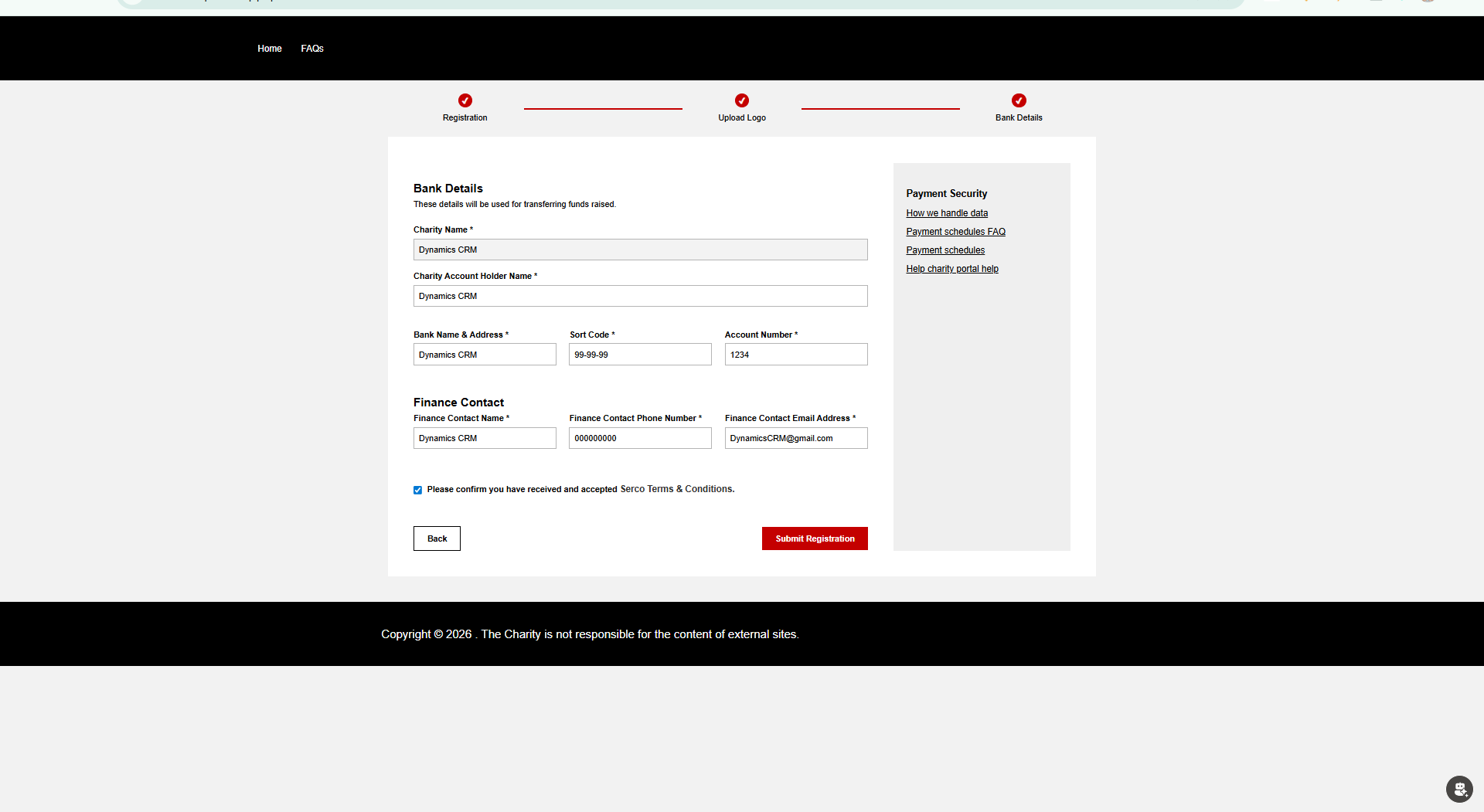
This page captures secure banking information used for fund transfers.
Step-by-step implementation:
- Displayed charity name as read-only.
- Collected bank account holder name, bank name, sort code, and account number.
- Collected finance contact details (name, phone, email).
- Added Terms & Conditions confirmation checkbox.
- Implemented strict validation before submission.
- On clicking 'Submit Registration', the Charity record is updated with bank details.
Bank Details Page – HTML, CSS & JavaScript Implementation
Below is the full implementation code used in the Bank Details Portal. The code is displayed for reference only and is not executed inside this blog.
<style>
    /* ================= RESET ================= */
    #mainContent, .wrapper-body, .page-copy, .container {
        max-width: 100% !important;
        padding: 0 !important;
    }

    body {
        font-family: Arial, Helvetica, sans-serif;
        background: #f2f2f2;
    }

    /* ================= PROGRESS BAR ================= */
    .bbc-progress-container {
        max-width: 1100px;
        margin: 20px auto;
        padding: 0 40px;
    }

    .bbc-progress-wrapper {
        display: flex;
        align-items: center;
    }

    .bbc-progress-step {
        display: flex;
        flex-direction: column;
        align-items: center;
        min-width: 160px;
        font-size: 14px;
    }

    .bbc-circle {
        width: 22px;
        height: 22px;
        border-radius: 50%;
        border: 2px solid #c40000;
        display: flex;
        align-items: center;
        justify-content: center;
        font-size: 12px;
        font-weight: bold;
        color: #fff;
        background: #ce1515;
    }

    .bbc-progress-step.done .bbc-circle,
    .bbc-progress-step.active .bbc-circle {
        background: #c40000;
    }

    .bbc-progress-line {
        flex: 1;
        height: 3px;
        background: #c40000;
        margin: 0 12px;
    }

    .bbc-text {
        margin-top: 6px;
        font-size: 13px;
        text-align: center;
    }

    /* ================= PAGE ================= */
    .bbc-bank-page {
        max-width: 1100px;
        margin: 0 auto 40px;
        background: #fff;
        padding: 40px;
        display: flex;
        gap: 40px;
    }

    /* ================= LEFT FORM ================= */
    .bbc-bank-form {
        flex: 3;
    }

    .bbc-bank-form h2 {
        font-size: 18px;
        font-weight: bold;
        margin: 30px 0 5px;
    }

    .bbc-desc {
        font-size: 13px;
        margin-bottom: 20px;
    }

    /* ================= GRID ================= */
    .bbc-row {
        display: flex;
        gap: 20px;
        margin-bottom: 15px;
        align-items: flex-start;
    }

    .bbc-col {
        width: 100%;
        display: flex;
        flex-direction: column;
    }

    /* ================= LABELS & INPUTS ================= */
    .bbc-label {
        font-size: 13px;
        font-weight: bold;
        margin-bottom: 4px;
    }

    .bbc-input {
        width: 100%;
        height: 34px;
        padding: 7px;
        font-size: 13px;
        border: 1px solid #b5b5b5;
        box-sizing: border-box;
    }

    .bbc-input.error {
        border-color: #c40000;
    }

    /* ================= INLINE ERROR ================= */
    .bbc-inline-error {
        font-size: 12px;
        color: #c40000;
        margin-top: 4px;
        min-height: 14px;
        line-height: 14px;
        visibility: hidden;
    }

    .bbc-input.error + .bbc-inline-error {
        visibility: visible;
    }
</style>

<!-- ================= PROGRESS BAR ================= -->
<div class="bbc-progress-container">
    <div class="bbc-progress-wrapper">

        <div class="bbc-progress-step done">
            <span class="bbc-circle">✔</span>
            <span class="bbc-text">Registration</span>
        </div>

        <div class="bbc-progress-line done"></div>

        <div class="bbc-progress-step done">
            <span class="bbc-circle">✔</span>
            <span class="bbc-text">Upload Logo</span>
        </div>

        <div class="bbc-progress-line"></div>

        <div class="bbc-progress-step active">
            <span class="bbc-circle">3</span>
            <span class="bbc-text">Bank Details</span>
        </div>

    </div>
</div>

<!-- ================= PAGE BODY ================= -->
<div class="bbc-bank-page">

    <div class="bbc-bank-form">
        <h2>Bank Details</h2>
        <div class="bbc-desc">These details will be used for transferring funds raised.</div>

        <label class="bbc-label">Charity Name *</label>
        <input id="crm_charityname" class="bbc-input" readonly>

        <label class="bbc-label">Charity Account Holder Name *</label>
        <input id="crm_accountholdername" class="bbc-input">
        <div class="bbc-inline-error">This Charity Account Holder Name is required</div>

        <label class="bbc-label">Bank Name & Address *</label>
        <input id="crm_bankname" class="bbc-input">
        <div class="bbc-inline-error">This Bank Name & Address is required</div>
    </div>

</div>

<script>

/* ================= GLOBAL ================= */
var loggedInContactId = "{{ user.id | default: '' }}";
var charityId = null;

/* ================= SAFE AJAX ================= */
window.safeAjax = function (options) {
  var deferred = $.Deferred();
  shell.getTokenDeferred().done(function (token) {
    options.headers = options.headers || {};
    options.headers["__RequestVerificationToken"] = token;
    $.ajax(options)
      .done(function (data, textStatus, xhr) {
        deferred.resolve(data, textStatus, xhr);
      })
      .fail(function (xhr) {
        deferred.reject(xhr);
      });
  });
  return deferred.promise();
};

/* ================= DOCUMENT READY ================= */
$(document).ready(function () {

  if (!loggedInContactId) {
    alert("User not logged in");
    return;
  }

  loggedInContactId = loggedInContactId.replace(/[{}]/g, "");

  fetchCharityAndBankDetails();

  $("#submitBankDetails").on("click", function (e) {
    e.preventDefault();
    submitBankDetails();
  });
});

/* ================= FETCH CHARITY + BANK DETAILS ================= */
function fetchCharityAndBankDetails() {

addLoader();


  safeAjax({
    type: "GET",
    url:
      "/_api/crm_gmrcharities?" +
      "$select=" + [
        "crm_gmrcharityid",
        "crm_name",
        "crm_bankname",
        "crm_accountholdername",
        "crm_sortcode",
        "crm_accountnumber",
        "crm_financecontactname",
        "crm_financecontactphone",
        "crm_financecontactemail",
        "crm_acceptedsercoterms",
        "crm_registrationcompleted",
        "crm_logouploded",
        "crm_bankdetailscompleted"
      ].join(",") +
      "&$filter=_crm_portaluser_value eq '" + loggedInContactId + "'",

    success: function (res) {

      if (!res.value || res.value.length === 0) {
        alert("No registration found.");

        removeLoader();

        window.location.href = "/registration/";
        return;
      }

      var data = res.value[0];
      charityId = data.crm_gmrcharityid;

      $("#crm_charityname")
        .val(data.crm_name || "")
        .prop("readonly", true)
        .css("background-color", "#f3f3f3");

      $("#crm_bankname").val(data.crm_bankname || "");
      $("#crm_accountholdername").val(data.crm_accountholdername || "");
      $("#crm_sortcode").val(data.crm_sortcode || "");
      $("#crm_accountnumber").val(data.crm_accountnumber || "");
      $("#crm_financecontactname").val(data.crm_financecontactname || "");
      $("#crm_financecontactphone").val(data.crm_financecontactphone || "");
      $("#crm_financecontactemail").val(data.crm_financecontactemail || "");

      $("#crm_acceptedsercoterms").prop(
        "checked",
        data.crm_acceptedsercoterms === true ||
        data.crm_acceptedsercoterms === "true" ||
        data.crm_acceptedsercoterms === 1
      );

      applyProgressBarState(data);

        removeLoader();


    }
  });
}

/* ================= PROGRESS BAR ================= */
function applyProgressBarState(data) {

  $(".bbc-progress-step").removeClass("done active");
  $(".bbc-progress-line").removeClass("done");

  $("#step1 .bbc-circle").text("1");
  $("#step2 .bbc-circle").text("2");
  $("#step3 .bbc-circle").text("3");

  if (data.crm_registrationcompleted) {
    $("#step1").addClass("done");
    $("#step1 .bbc-circle").text("✔");
    $("#line1").addClass("done");
  }

  if (data.crm_logouploded) {
    $("#step2").addClass("done");
    $("#step2 .bbc-circle").text("✔");
    $("#line2").addClass("done");
  }

  if (data.crm_bankdetailscompleted) {
    $("#step3").addClass("done");
    $("#step3 .bbc-circle").text("✔");
  } else {
    $("#step3").addClass("active");
  }
}


function submitBankDetails() {

    addLoader();
    let valid = true;

    const fields = [
        "crm_accountholdername",
        "crm_bankname",
        "crm_sortcode",
        "crm_accountnumber",
        "crm_financecontactname",
        "crm_financecontactphone",
        "crm_financecontactemail"
    ];

    // TEXT FIELD VALIDATION
    fields.forEach(function (id) {
        const input = document.getElementById(id);

        if (!input || !input.value.trim()) {
            input.classList.add("error");
            valid = false;
        } else {
            input.classList.remove("error");
        }
    });

    // CHECKBOX VALIDATION (manual visibility)
    const checkbox = document.getElementById("crm_acceptedsercoterms");
    const checkboxError = document.getElementById("err_crm_acceptedsercoterms");

    if (!checkbox.checked) {
        checkboxError.style.visibility = "visible";
        valid = false;
    } else {
        checkboxError.style.visibility = "hidden";
    }

    if (!valid) {
        removeLoader();
        return;
    }

    const record = {
        crm_bankname: $("#crm_bankname").val(),
        crm_accountholdername: $("#crm_accountholdername").val(),
        crm_sortcode: $("#crm_sortcode").val(),
        crm_accountnumber: $("#crm_accountnumber").val(),
        crm_financecontactname: $("#crm_financecontactname").val(),
        crm_financecontactphone: $("#crm_financecontactphone").val(),
        crm_financecontactemail: $("#crm_financecontactemail").val(),
        crm_acceptedsercoterms: true,
        crm_bankdetailscompleted: true
    };

    safeAjax({
        type: "PATCH",
        url: "/_api/crm_gmrcharities(" + charityId + ")",
        contentType: "application/json",
        data: JSON.stringify(record),
        success: function () {
            removeLoader();
            window.location.href = "/";
        },
        error: function () {
            removeLoader();
            alert("Failed to save bank details");
        }
    });
}


/* ================= VALIDATION ================= */
function validateField(id) {
  const val = $("#" + id).val().trim();
  if (!val) {
    $("#" + id).addClass("error");
    $("#err_" + id).show();
    return false;
  }
  $("#" + id).removeClass("error");
  $("#err_" + id).hide();
  return true;
}


function sortCodeMask(input) {
    let value = input.value.replace(/\D/g, '');

    // Allow only 6 digits
    if (value.length > 6) {
        value = value.substring(0, 6);
    }

    // Insert dash after every 2 digits
    let formatted = '';
    for (let i = 0; i < value.length; i++) {
        if (i > 0 && i % 2 === 0) {
            formatted += '-';
        }
        formatted += value[i];
    }

    input.value = formatted;
}

document.addEventListener("DOMContentLoaded", function () {
    const input = document.getElementById("crm_sortcode");

    if (input) {
        input.addEventListener("input", function () {
            sortCodeMask(input);
        });
    }
});

/* ================= TERMS MODAL ================= */
function openSercoTerms() {
  $("#termsModal").show();
}
function closeTerms() {
  $("#termsModal").hide();
}

/* ================= NAV ================= */
function goBack() {
  window.location.href = "/upload-logo/";
}

</script>
9. Progress Bar Implementation

A visual progress bar is displayed on all registration pages.
What we implemented:
- Each step represented visually at the top.
- Completed steps marked with a tick.
- Current step highlighted.
- Users cannot skip mandatory steps.
10. Validation & User Experience
Validations were implemented at every stage to ensure data accuracy.
Examples:
- Mandatory field checks
- URL format validation
- Image size and type validation
- Terms & Conditions confirmation
11. Final Outcome
After completing all steps, the charity registration is fully submitted. All data is securely stored in CRM, linked to the authenticated user, and ready for internal review or approval.