Create an AI-Generated Site Using Copilot
Create an AI-Generated Site Using CopilotCreate an AI-Generated Site Using Copilot
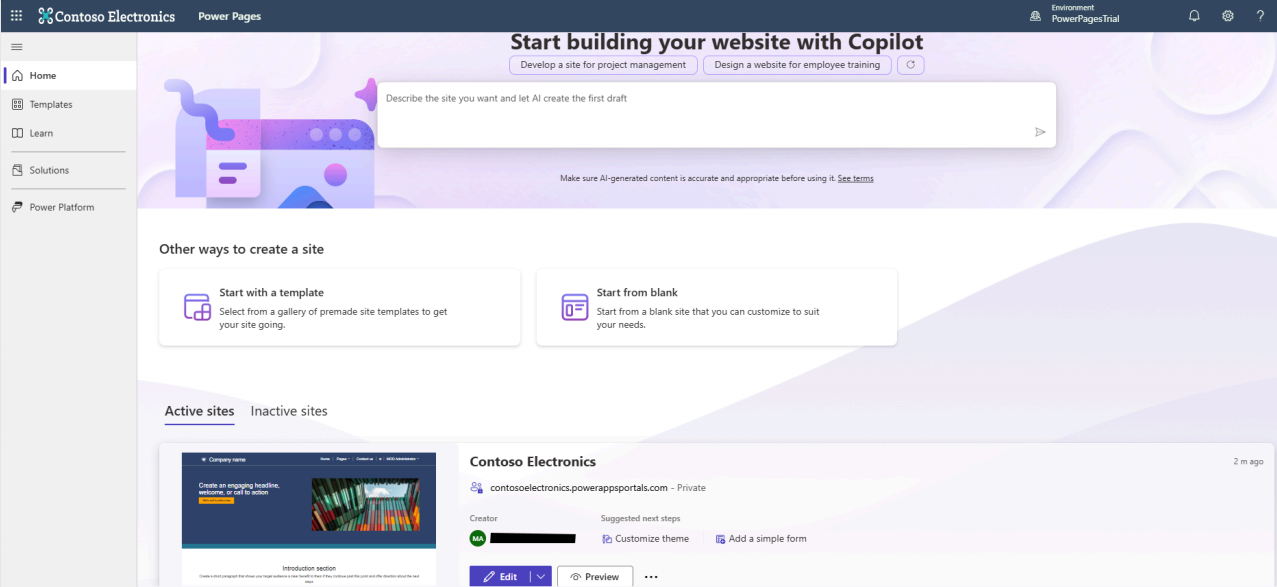
Copilot for site creation allows you to build Power Pages websites using AI. By simply describing the type of site you want, Copilot automatically designs and sets up the site for you.
Using natural language, you can specify:
- The purpose of the site
- The intended users
- The type of information the site should handle
Based on your description, Copilot automatically generates:
- A contextual site name and web address
- A home page layout
- Additional pages with HTML content, relevant text, and images
- A structured sitemap with all generated pages
After the site is created, you can further refine and edit the pages using Copilot and the WYSIWYG editor.
Prerequisites
Important: The Enhanced Data Model must be enabled to use Copilot for site creation.Create a Site Using AI (Steps)
- Navigate to Power Pages.
- Enter a description of the site you want to create, or choose a suggested description.
- Press Enter or select the paper airplane icon.
-
Example descriptions:
- Build a public transportation website for city residents to view routes and fares.
- Create a site for customers to find financial advisors at a bank based on expertise and qualifications.
- Copilot generates a suggested site name and web address. Modify them if required, then select Next.
- Copilot creates a home page layout. Review the layout, select Try again to regenerate, or choose Next to accept it.
- Copilot suggests additional pages for the site. Describe any extra pages if needed and select Done.
- Site creation may take a few minutes. Once completed, you are redirected to the Design Studio, where you can further customize the site.