Create an AI-generated webpage using Copilot
Create an AI-generated webpage using CopilotCreate an AI-generated webpage using Copilot
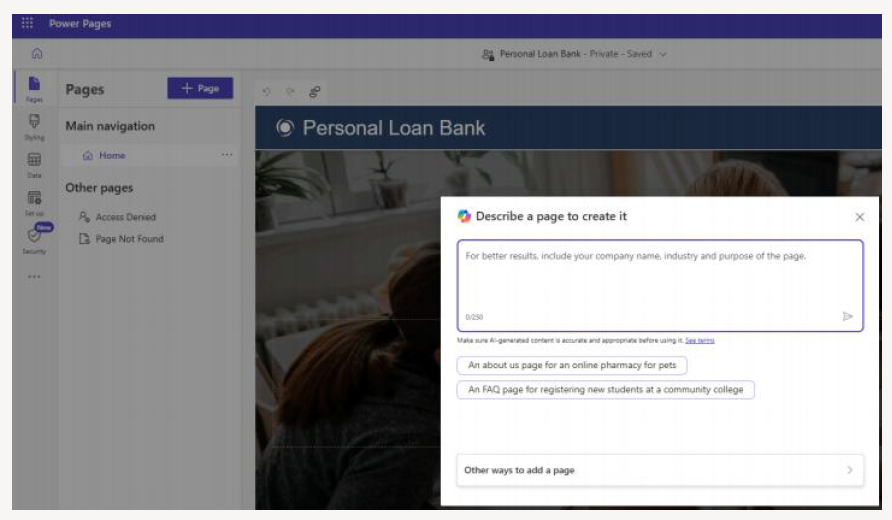
You can build a new page on your site simply by describing its purpose. Copilot will generate the page’s HTML, complete with relevant text and images based on your description.
The newly created page is automatically added to your site’s main navigation. You can then refine or modify the content using Copilot or the WYSIWYG editor.
Create a new page
- Select + Page to begin.
- After Copilot generates your page, choose Keep it if you're satisfied with the result, or Delete page if you want to discard it.
- Copilot automatically creates the page and adds it to the main navigation. You can review the layout and content and make updates such as editing sections, text, or images using the WYSIWYG editor.
Generate a webpage
Copilot generates the page and adds it to the main navigation. You can review the page and its content and edit sections, text, and images using the WYSIWYG editor.
Discard a Copilot-generated webpage
If you decide not to keep the page created by Copilot, you can undo the changes. This action removes all updates made by Copilot and deletes the generated page.
Note:Pages created by Copilot may include images stored as web files.
Edit a page with Copilot
You can update an existing page using Copilot by entering specific commands in the Copilot input box.
| Available commands | Description |
|---|---|
| Add a section | Copilot generates a new section with text and images and adds it to the bottom of the page. |
| Add a form | For details on adding a form using Copilot, see Create AI-generated form using Copilot. |