Create forum posts
Create Forum Posts - Power PagesCreate Forum Posts
A forum post is a message submitted by a user, displayed along with the author’s details and the time it was posted. Each post appears inside a thread, with the first post acting as the original post (OP).
- Users can edit or delete their own posts.
- Replies appear in sequence as the discussion grows.
- Conversations may sometimes go off-topic.
How to Create a Forum Post (From the Website)
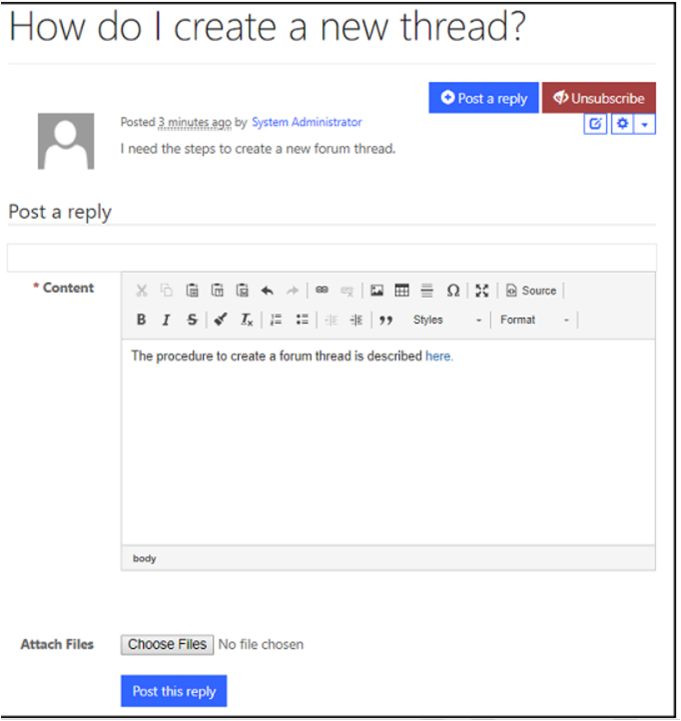
The post editor automatically appears when a signed-in user navigates to a forum thread, provided the page template includes posting functionality.
- Sign in to the website.
- Open the forum thread where you want to post.
- Type your reply in the rich text editor.
- Select Post this reply.
Attribute Relationships
The following attributes are commonly used for Forum Posts in Power Pages. The display of these attributes depends on the configured page template.
- Name – Title of the post. Required.
- Forum Thread – The thread to which the post belongs.
- Author – The contact/user who created the post.
- Date – Date and time when the post was created.
- Content – Main message or body of the post.
- Answer – Indicates the post is marked as the accepted answer.