Crowdsource ideas
Crowdsource Ideas in Power PagesCrowdsource Ideas
This guide explains how to manage Idea Forums, Idea Comments, and Idea Votes in Power Pages. Users can manage idea-related records under the Community tab once the required site customizations are imported into the Microsoft Dataverse environment.
Idea Forum Attributes and Relationships
The table below outlines the standard fields and relationships available in the Idea Forum table.
| Name | Description |
|---|---|
| Title | Name of the idea forum. |
| Website | The website associated with the idea forum. |
| Partial URL | URL segment used to build the site URL for the idea forum. |
| Summary | HTML description of the idea forum. |
| Ideas | Relationship containing all idea records linked to the forum. |
| Name | Description |
|---|---|
| New Idea Policy | Defines how newly submitted ideas are handled. |
| Comment Policy | Defines how comments on ideas are managed. |
| Idea Content Moderation Policy | Content moderation configuration for ideas. |
| Voting Policy | Defines the voting behavior for the forum. |
| Type of Voting | Specifies the type of voting allowed. |
| Votes Per Idea | Number of votes a user may cast on a single idea. |
| Votes Per User | Total votes permitted per user in the forum. |
| Roles with Read Access | Web roles permitted to view and participate in the forum. |
| Moderators | Web roles allowed to moderate the forum. |
Manage Ideas in a Power Pages Site
After site customizations are imported, users can manage ideas from the Community tab.
| Name | Description |
|---|---|
| Title | Title of the idea. |
| Idea Forum | The forum to which the idea belongs. |
| Partial URL | URL path for building the idea’s public link. Should contain only letters, numbers, hyphens, or underscores. |
| Published to Web | Determines if the idea is visible on the website. |
| Copy | HTML content describing the idea. |
| Summary | Short description of the idea. |
| Author Name / Email | Information about the submitter. |
| Author | Relationship linking the idea to the submitting user. |
| Submitted On | Date and time of submission. |
| Status Reason | Indicates the idea’s lifecycle stage (New, Accepted, Completed, Rejected). |
| Moderation Status | Indicates if the idea is being moderated. |
| Moderation Reason | Reason selected when users flag ideas (Spam, Inappropriate, Abusive). |
| Moderation Comment | Comment added during moderation. |
| Status Comment | Optional explanation related to the idea’s status. |
| Votes | Vote statistics including up, down, sum, and total votes. |
| Comments / Votes | Relationships to idea comments and votes. |
Enable Voting for Status Reasons
By default, voting is allowed only when the Status Reason is New. To allow voting for additional statuses, create the following site setting:
- Name: Ideas/EnableVotingForStatusReasons
- Value: Semicolon-separated list of status reason values
Example: Enable voting for New, Accepted, and Rejected:
1;100000000;100000002
If the setting is missing or invalid, voting defaults to New only.
To find status reason numeric values:
- Sign in to Power Pages.
- Go to Settings → Customization → Customize the System.
- Navigate to Entities → Idea → Fields.
- Open the statuscode field.
- View the list of statuses and their values.
Enable Autocomplete for Ideas
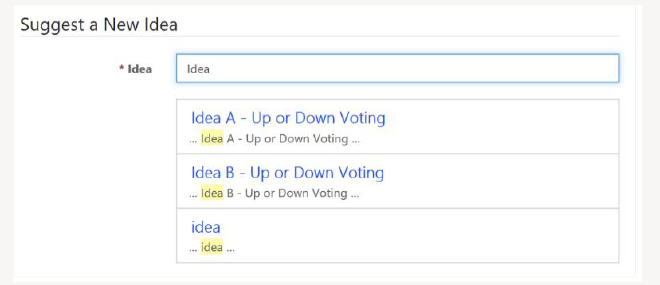
To prevent duplicate submissions, configure the site to show similar ideas during idea creation.
- Name: Ideas/EnableAutoComplete
- Value: True
Manage Idea Comments
Users can manage Idea Comment records under the Community tab.
| Name | Description |
|---|---|
| Name | Title of the comment. |
| Idea | The associated idea. |
| Content | Comment content in HTML format. |
| Published to Web | Determines if the comment is publicly visible. |
| Author | Relationship to the submitting user. |
| Posted On | Date and time of comment creation. |
Manage Idea Votes
Idea Vote records can also be managed under the Community tab.
| Name | Description |
|---|---|
| Value | Numerical vote value. |
| Idea | The associated idea. |
| Voter | Relationship to the user who voted. |
| Submitted On | Date and time of submission. |