Driving empathetic customer conversations with Email Sentiment
Customers today expect more than a fast response — they expect to feel heard. Support emails often carry clear emotional signals like frustration, urgency, or appreciation, and when those are missed, even a correct reply can feel cold and increase escalation risk.
Email Sentiment in Dynamics 365 Customer Service brings that emotional context directly into the email workflow, helping service representatives respond with the right tone, empathy, and intent.
What is Email Sentiment?
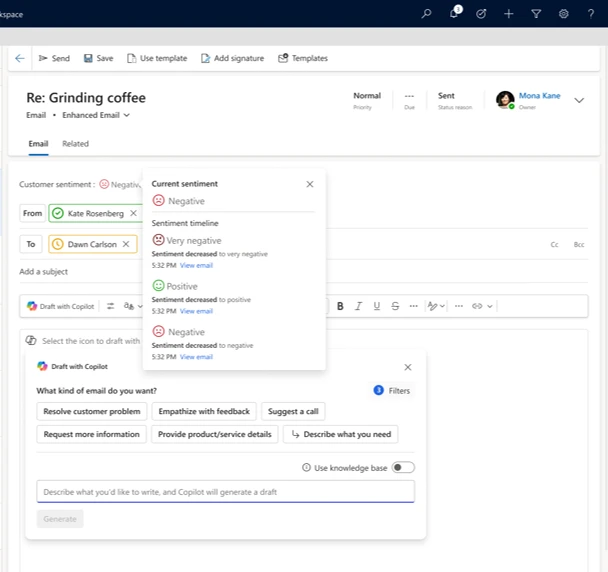
An AI‑powered capability that automatically analyzes incoming customer emails and classifies their tone as Positive, Neutral, or Negative. The insight surfaces in the email and case workspace before the service representative drafts a reply — so they understand not just what the customer is asking, but how they feel.
Why sentiment awareness matters
Customers come from different backgrounds, geographies, and cultures, all of which shape how they express concern or frustration. Meanwhile, service teams handle high email volumes across regions, languages, and time zones, where emotional cues are easy to miss in long or complex messages.
With Email Sentiment in Dynamics 365 Customer Service, organizations can:
- Recognize dissatisfied or frustrated customers earlier
- Help service representatives proactively adjust tone and prioritize higher‑risk conversations
- Drive more empathetic communication, lower escalations, and stronger relationships
How it works
When a customer writes in after repeated service disruptions, Email Sentiment flags the message as Negative before service representatives reply. With that context, they can acknowledge frustration upfront, adopt a calmer tone, and focus on resolution — responding thoughtfully from the first reply instead of reacting after an escalation.
Key capabilities
- Automatic sentiment detection — no manual tagging or configuration
- In‑context insights — displayed directly in the email and case experience
- Consistent interpretation at scale — uniform classification across representatives and regions
- Language‑aware foundation — supports quality assessment and multilingual scenarios
- Actionable emotional signals — enables prioritization and empathy‑driven responses
- Email sentiment timeline — tracks sentiment evolution across a thread to spot inflection points
- Case sentiment — rolls email signals into a unified case sentiment for smarter prioritization
Designed for customer-obsessed organizations
Email Sentiment in Dynamics 365 Customer Service complements Email Assist and case management by adding emotional intelligence to everyday interactions, so empathy is built into the platform, not left to individual interpretation.
Learn more
- Configure sentiment analysis for emails | Microsoft Learn
- View, compose and respond to email — Power Apps | Microsoft Learn
The post Driving empathetic customer conversations with Email Sentiment appeared first on Microsoft Dynamics 365 Blog.
Source: This article is curated from Microsoft Dynamics 365 Blog. Visit the original post for more details and official documentation.