How Server-Side Caching Works in Power Pages
Server-Side Caching in Power PagesMetadata / Configuration Tables
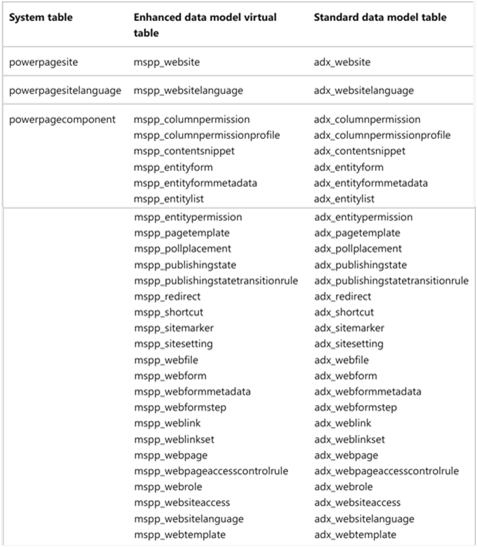
Metadata or configuration tables store website setup and configuration data such as web pages, templates, content snippets, forms, lists, and site settings.
Key Characteristics
- Configuration data is identical for all users.
- Data is automatically cached.
- Cache is automatically refreshed when any configuration record is modified.
- Cache refresh follows a service-level agreement (SLA) of up to 15 minutes.
- No configuration changes are required to enable this caching.
- The list of configuration tables is fixed and cannot be customized.
- All configuration tables must have change notifications enabled (this is enabled by default and should not be modified).
Clearing Configuration Cache Manually
If immediate visibility of changes is required, the cache can be cleared manually using one of the following options:
- Design Studio: Selecting Preview in Design Studio clears the configuration cache.
-
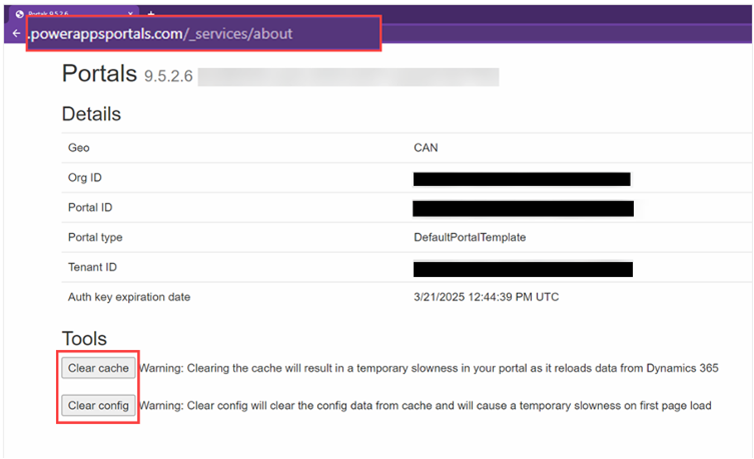
/_services/about:
Navigate tohttps://<site-url>/_services/aboutand select Clear Config or Clear Cache. The user must have a web role with Website Access permissions.
Data Tables (Business Data)
Data tables store business data that is displayed to users on the website.
Key Characteristics
- Data is typically cached per user.
-
Exceptions include:
- Anonymous users
- Tables with global permissions
- Only the data accessed by a user is cached — not the entire table.
Cache Refresh Behavior
The data cache is refreshed in the following scenarios:
- When any record in a table (or a related table) is created, updated, or deleted by a website user, the cache for that table is cleared immediately for all users.
- Even without changes, the cache is automatically refreshed every 15 minutes.
The Clear Cache option clears both data tables and configuration tables. It should be used sparingly, especially on high-traffic production sites, as it can cause temporary performance degradation.