Introducing Service Operations Agent in Dynamics 365 Contact Center
In contact centers, operational excellence doesn’t start with the first customer interaction—it starts much earlier, during setup, configuration, and ongoing system health management. Yet for many organizations, these steps remain complex, time-consuming, and error-prone.
To solve for these, we are excited to preview Service Operations Agent, a new AI-powered capability in Dynamics 365 Contact Center transforming how administrators configure, validate, and orchestrate conversations at runtime.
Why this matters
Setting up and maintaining a contact center environment often requires navigating multiple tools, understanding complex dependencies, and manually troubleshooting issues. These challenges can result in:
- Slow onboarding and delayed time to value
- Configuration errors that impact routing, channels setup
- Conversations managed by static rules that cannot adapt — ignoring wait time, customer tier, agent availability, or transfer history — leading to poor outcomes that no one is actively watching
- Limited visibility into system health and operational readiness
- Reliance on specialized expertise for basic administrative tasks
These traditional approaches fragment setup, validation, and diagnostics across multiple surfaces—making it difficult to ensure consistency and operational reliability.
Service Operations Agent addresses these by bringing these capabilities together into a unified, conversational experience.
What’s new
Service Operations Agent introduces an AI-powered administration layer built directly into Dynamics 365 Contact Center, enabling administrators to:
- Set up contact center channels and manage users conversationally
- Receive recommendations on next steps from agent
- Dynamic orchestration of conversations to handle needs of a working contact center during run time through playbooks
- Validate configurations and detect issues early when connected to Application Insights
- Monitor operational health and troubleshooting guidance
Together, these capabilities give administrators a single place to set up the contact center, keep it healthy, and define how every conversation is handled at runtime — from first contact through resolution.
How it works
Service Operations Agent is available directly within the Dynamics 365 Contact Center Admin Center, where administrators can interact with it using natural language.
The agent guides users through tasks such as:
- Setting up channels, queues, workstreams
- Managing users and skills
- Applying playbooks using provided templates for dynamic orchestration of conversations
- Configuration validation and troubleshooting through Application Insights
This creates a more intuitive and streamlined administrative workflow—reducing complexity while maintaining control and governance.
Key capabilities in this preview release
In this preview release, Service Operations Agent focuses on three core areas: setup, diagnostics and conversation orchestration.
Conversational setup and configuration
Administrators can use natural language to provision and configure key components such as queues and channels—reducing reliance on manual configuration flows. This approach streamlines onboarding and helps organizations get up and running faster, even without deep technical expertise.
 User prompting agent to create a queue and add users to it
 Agent response with details about successful queue creation and addition of users, as well as recommended next steps.
Intelligent validation and diagnostics
Service Operations Agent continuously evaluates configurations and surfaces potential issues, helping administrators:
- Identify misconfigurations early
- Understand root causes of setup issues
- Receive actionable recommendations for resolution
Embedding diagnostics into the admin workflow reduces operational risk and improves reliability over time.
Conversation orchestration
Define how conversations are managed throughout their lifecycle, not just at entry. Playbooks let admins set conditions based on customer context, wait time, and queue state, and trigger automatic actions without manual supervisor intervention. They are authored using guided templates in the admin center — no rules to write, no code to maintain. Built-in validation catches conflicts before anything goes live. These capabilities are available now in public preview:
- Dynamic prioritization: A playbook continuously monitors wait time and customer context. When conditions are met — for example, a premium customer waiting beyond a threshold with no senior agents available — their priority is automatically elevated. High-value and long-waiting customers rise to the top without anyone watching the queue.
- Overflow based on CSR availability: A playbook fires the moment a queue has no eligible agents. Based on customer segment, it transfers to a backup queue, offers a callback, or sends a graceful closing message. Every customer gets a response. None of them wait in silence.
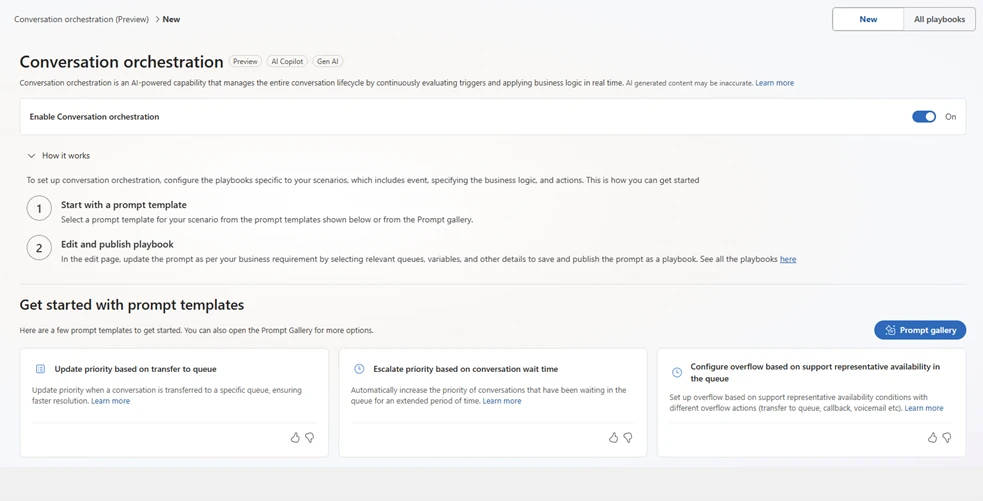 Options for setting up conversation orchestration.
Key benefits
With Service Operations Agent, organizations can:
- Accelerate time to value by simplifying setup and onboarding
- Reduce configuration errors through built-in validation and guidance
- Improve operational reliability with proactive diagnostics
- Lower dependency on specialized expertise with conversational experiences and templates for playbooks
- Improve customer experience by automatically managing in-queue conversations — reducing wait times, preventing silent overflow, and ensuring high-value customers are prioritized without supervisor intervention
- Continuously optimize contact center performance with ongoing insights
Together, these capabilities establish a strong foundation for building, scaling, and managing modern contact centers.
Looking ahead
Service Operations Agent is part of a broader vision to bring agentic experiences for administrators in Dynamics 365 so we can assist them in their jobs to be done. Some of these are enhanced automation, better troubleshooting, simulated conversations for validating behavior and improved insights. For orchestrating conversations, we will provide capabilities to improve the in-queue lifecycle experience, such as re-connecting customers to their last customer service representative, handling overflows for direct-dial lines, out-of-hours queues, etc. Each new capability builds on the same playbook foundation — everything configured today carries forward as the platform grows.
All these additional exciting capabilities are soon to follow!
Learn more
- Public documentation for setup and diagnostics capabilities: Use Service Operations Agent in Dynamics 365 Contact Center (preview) | Microsoft Learn
- Conversation orchestration capability: Configure conversation orchestration using AI-powered playbooks (preview)
The post Introducing Service Operations Agent in Dynamics 365 Contact Center appeared first on Microsoft Dynamics 365 Blog.
Source: This article is curated from Microsoft Dynamics 365 Blog. Visit the original post for more details and official documentation.