Manage blogs
Manage Blogs - Power PagesManage Blogs
Power Pages allows you to manage blogs, blog posts, and blog comments from both Power Pages Studio and the portal content editor. Blog authors can directly edit or delete content on the website when they have the required permissions.
Manage Blogs from the Portal Content Editor
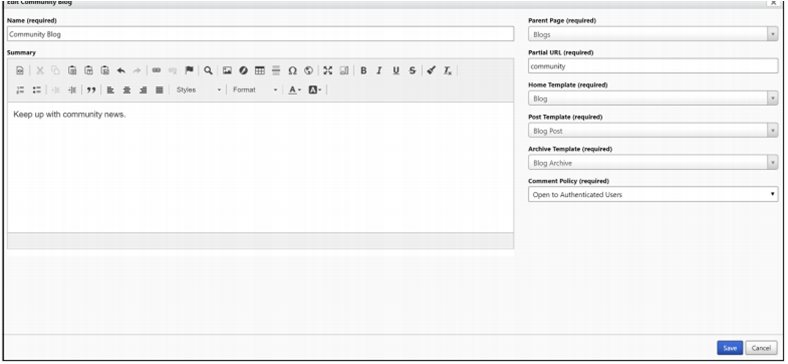
Users with blog author permissions can edit or delete blogs through inline editing. The edit toolbar appears automatically after signing in with the correct web roles.
- Edit a Blog: Go to the blog home page → Select Edit
- Delete a Blog: Select Delete → Confirm with Yes
Blog Security
Read Access
Inherited from the parent page. If a user can read the parent page, they can read the blog and all published posts.
Write / Change Access
Controlled by Author Roles, which allow users to:
- Create posts
- Edit or delete their own posts
- Edit blog settings
Only the post author can edit or delete their own posts from the front-end.
Blog Attributes
- Name – Title of the blog
- Website – Website where the blog belongs
- Parent Page – Parent webpage in the hierarchy
- Partial URL – URL segment using letters, numbers, hyphens, or underscores only
- Home Template – Template for the blog home page
- Post Template – Template for individual blog posts
- Archive Template – Template for archived posts
- Summary – Short HTML description
- Comment Policy – Controls post comments
- Blog Posts – Relationship listing all posts
- Author Roles – Roles that allow blog management
Create a Blog Post
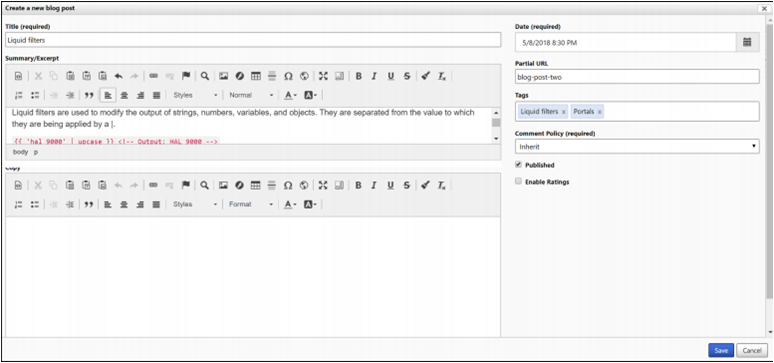
Follow these steps to create a new blog post:
- Go to the blog’s home page
- Select New → Blog Post
- Fill in the post details
- Select Save
Edit a Blog Post
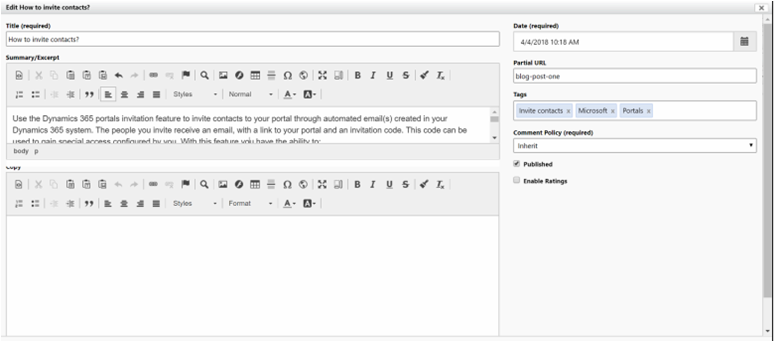
To modify an existing post:
- Navigate to the post page
- Select Edit
- Make changes and save
Delete a Blog Post
- Select Delete → Confirm with Yes
Blog Post Attributes
- Title – Name of the blog post
- Blog – Blog where the post belongs
- Partial URL – URL segment for the post page
- Author – User who created the post
- Date – Publishing date used for sorting
- Summary – Short excerpt
- Copy – Full HTML content
- Published – Controls visibility
- Comment Policy – Controls comments
- Blog Post Comments – All related comments
- Web Files – Attached files
- Tags – Labels associated with the post
Manage Blog Post Comments
Users with blog author permissions can manage comments through inline editing. Editing and deleting options depend on the page template configuration.
Blog Post Comment Attributes
- Name – Auto-generated descriptive name
- Blog Post – Associated blog post
- Author – Signed-in user contact
- Author Name – Display name for anonymous users
- Author Email – Email for anonymous submissions
- Author URL – Optional website link
- Posted On – Submission date/time
- Content – Full HTML comment
- Approved – Controls visibility