Manage forum threads
Manage Forum Threads in Power PagesManage Forum Threads
Overview
A forum thread (topic) is a collection of posts displayed chronologically. Each thread begins with an original post (OP) and updates whenever new posts are added. Active threads appear at the top of the list, while important threads can be marked as Sticky so they remain visible. Popularity is commonly measured by reply count and page views.
Manage Threads in Power Pages
Forum threads can be created, edited, and deleted directly in Power Pages. While management is possible through the portal management area, Microsoft recommends using the Content Editor to ensure correct association with the original post.
Create or Edit Threads (Power Pages Admin)
- Sign in to Power Pages.
- Go to Community → Forum Threads.
- Select New or open an existing thread to edit.
-
Fill in required fields:
- Name
- Forum
- Type
- First Post
- Last Post
- Select Save.
Create Threads from Website Content
If enabled in the page template:
- Sign in to the website.
- Navigate to the forum page.
- Enter Thread Title, choose Thread Type, and add content.
- Select Create this thread.
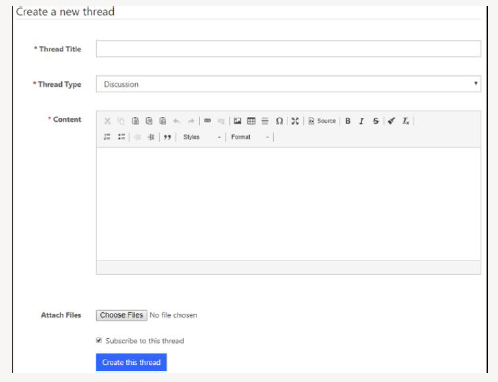
Forum Thread Attributes Used by Power Pages
The following attributes are commonly used and rendered based on the page template:
| Field | Description |
|---|---|
| Name | Thread title displayed in templates. Required field. |
| Website | Website(s) the thread is associated with. |
| Requires Answer | Allows posts to be marked as answers. |
| Display Order | Controls thread position relative to others. |
| Is Default | Marks the default thread type (one per site). |
| First Post | The original post that started the thread. |
| Last Post | The most recent post in the thread. |
| Post Count | Total number of posts. |
| View Count | Number of times the thread was viewed. |
Manage Forum Thread Types
Create or Edit Thread Types
- Go to Community → Forum Thread Types.
- Select New or open an existing type.
- Fill in the required fields and select Save.
Thread Type Attributes
| Field | Description |
|---|---|
| Name | Thread type name shown in templates. |
| Website | Associated website(s). |
| Requires Answer | Enables marking replies as answers. |
| Display Order | Controls list ordering. |
| Is Default | Sets the default thread type. |