Power Automate Work Queue Enhancements: SLA Alerts & Aggregated Operator View
A Unified Control Center for Queue Monitoring and SLA Tracking
Work queues in Power Automate are structured lists that let you assign, track, and manage work items across users or automations in an organized, scalable way. Whether you're running a handful of automated flows or managing enterprise-wide RPA operations, work queues are the backbone of reliable, auditable automation — and they just got a whole lot more powerful.
Microsoft has announced powerful new enhancements to work queues in the automation center that will fundamentally transform how your teams manage and monitor automated workflows. With the introduction of work queue alerts and the new aggregated operator view, businesses now have unprecedented visibility and control over their entire automation operations — from a single pane of glass. At CRMONCE, we've been helping organizations unlock the full potential of Power Automate, and these updates are genuinely game-changing.
What's New in Power Automate Work Queues
Work Queue Alerts for Admins in the Monitoring Hub
With monitoring in the Power Platform Admin Center (PPAC), you can now track the health and performance of your automation queues in real time. View live metrics on items pending action, exceptions requiring resolution, and overall queue status — giving you complete visibility across your automation operations at a glance.
Better still, you can now configure proactive alerts that notify you the moment SLA violation counts exceed thresholds defined by your organization's administrator. Receive timely notifications when queues require attention, ensuring your team can respond before service level agreements are compromised — not after.
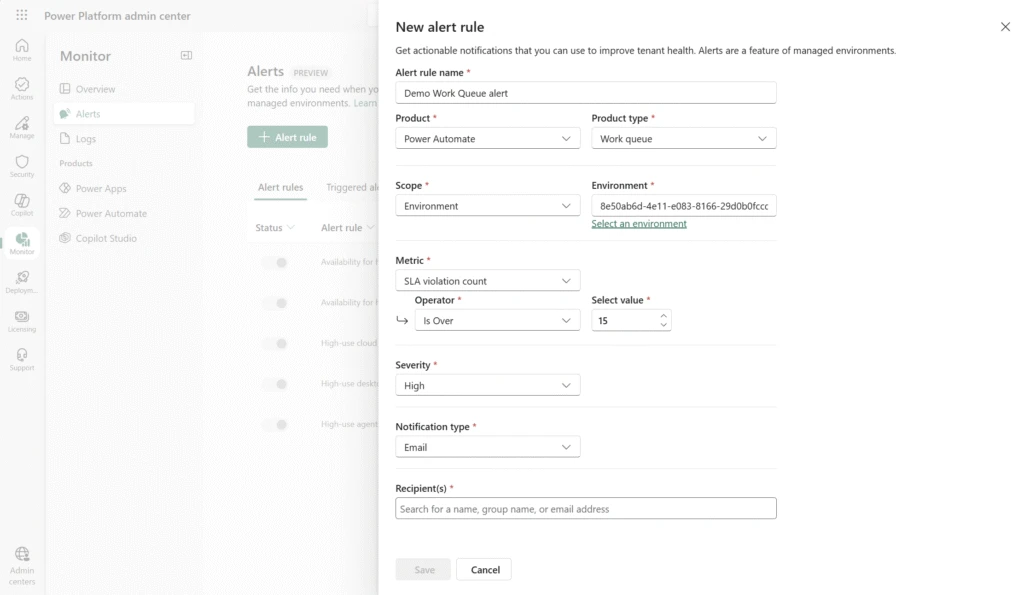
With SLA violation alerts, your team stays informed and responsive — automatically. No more manual queue monitoring; the system proactively comes to you when action is needed.
Aggregated View for Operators in the Automation Center
Operators now have access to a unified, comprehensive dashboard in the automation center that aggregates work queue data across your entire automation estate. No more switching between individual queues or piecing together a picture from fragmented data.
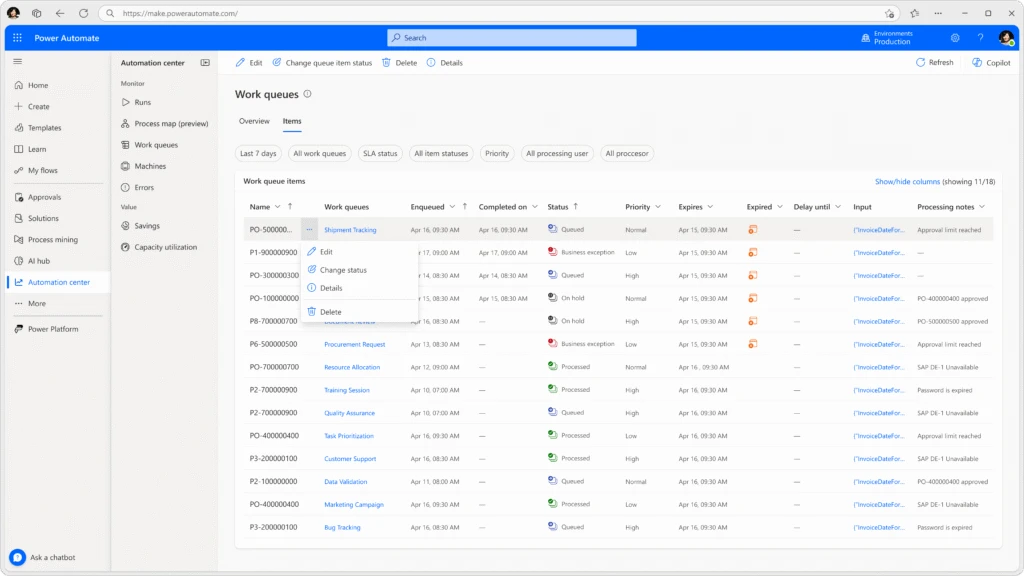
This consolidated view empowers operators to monitor multiple queues simultaneously, prioritize work more effectively, and respond to issues faster than ever before — all from a single, intuitive interface.
Top 5 Benefits of Using Work Queues in Power Automate
Not yet using work queues in your automation strategy? Here's why you should be — and why these new enhancements make the case even stronger:
- Increased Efficiency & Scalability — Work queues allow you to decouple complex processes, enabling different parts of an automation to run asynchronously and independently. Scale up without scaling complexity.
- Better Resource Utilization — Because work items are stored centrally, you can optimize robot usage, balance load across machines, and significantly reduce infrastructure overhead.
- Consistent Prioritization of Work — Work queues natively support priority-based execution, ensuring the most critical items are always processed first — automatically, without manual intervention.
- Centralized Monitoring & Exception Handling — Work queues deliver a human-in-the-loop monitoring experience, helping fusion teams track item statuses, manage exceptions, and take corrective actions with confidence.
- Improved Resiliency & Fault Tolerance — By decoupling work and allowing multiple robots to process items in parallel, your automations become inherently more resilient. Failed items can be retried automatically, reducing costly downtime and manual rework.
Ready to Optimize Your Automation Operations?
These new work queue enhancements represent a significant step forward for teams running automation at scale. Whether you're just getting started with Power Automate or looking to mature your existing Power Platform investment, having the right monitoring and alerting infrastructure in place is critical to long-term success.
At CRMONCE, our automation consultants specialize in designing and optimizing work queue architectures that scale with your business. From initial setup to advanced SLA configuration, we help you get maximum value from every automation you build.
Want to see how these enhancements could work for your organization? Get in touch with our team today — we'd love to help you take your automation operations to the next level.