Power Pages Connectivity with Microsoft Dataverse
Power Pages Connectivity with Microsoft DataversePower Pages Connectivity with Microsoft Dataverse
Microsoft Dataverse is a core component of every Power Pages website. It serves both as:
- A metadata repository for storing website configurations such as webpages, content snippets, site settings, and user metadata.
- A data store for business data used by the website.
This document explains how the Power Pages application server connects securely to a Power Platform environment using Dataverse.
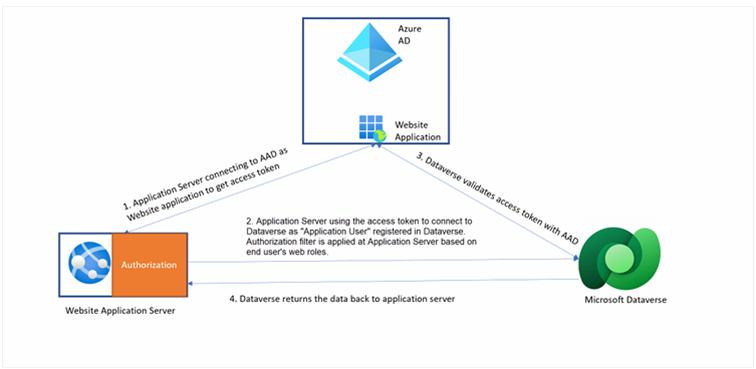
Power Pages User Model
End users accessing a Power Pages website are not Dataverse users. Therefore, Dataverse role-based security does not apply directly to them.
Instead:
- Their data access is controlled through Web Roles, which act as the role-based access control mechanism for Power Pages.
- Server-to-Server (S2S) connection is used for secure system access.
Server-to-Server (S2S) Connection
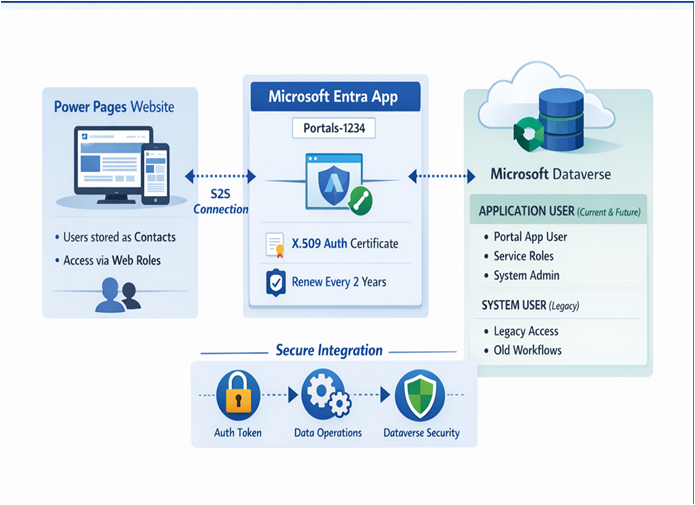
- Power Pages connects to Dataverse using a server-to-server (S2S) connection.
- When a Power Pages website is created, a Microsoft Entra application is automatically created.
- Each website has its own application named: Portals {portalid}.
- The application ID appears in the Setup workspace.
Do not modify or delete the auto-generated Microsoft Entra application. It is required for S2S authentication.
During website creation:
- An X.509 certificate is generated.
- The certificate is added to:
- The Microsoft Entra application
- The Power Pages application server
- The certificate is used to authenticate and obtain Dataverse access tokens.
The certificate expires every two years and must be renewed to avoid outages.
Integration with Dataverse
Depending on site creation date, Dataverse access uses:
- SYSTEM user (legacy)
- Application User (recommended)
SYSTEM User (Legacy)
All operations appear as performed by the SYSTEM user.
Application User (Modern Approach)
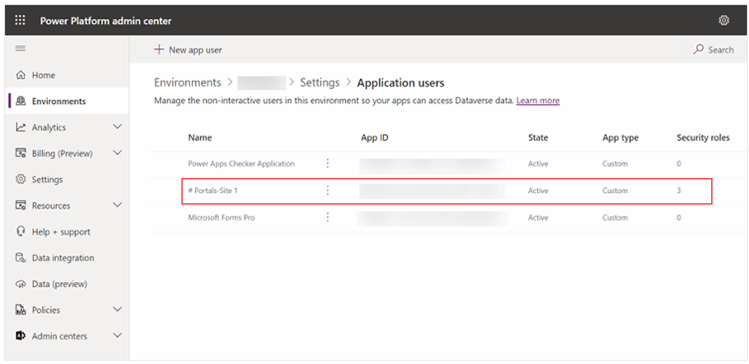
This user appears in:
- Power Platform Admin Center
- Access → S2S Apps
Application User Naming:
# Portals – <<Site Name>>
Assigned Permissions
Dataverse Security Roles
- Portal Application User
- Service Writer
- Service Deleter
Column Security Profile
- System Administrator
Do not change these roles or permissions — doing so may break the website.
Migration from SYSTEM User to Application User
Microsoft began migrating sites in 2023. Notifications are sent via:
- Microsoft 365 Message Center
- Email to tenant administrators
Preparation Guidelines
-
Update Liquid templates:
- Remove SYSTEM user filters
- Use table permissions + web roles instead
-
Review workflows:
- Reassign SYSTEM-owned workflows to the Application User