Power Pages templates
Power Pages TemplatesPower Pages Templates
When creating a new Power Pages site, you can select a starter layout template to begin building, or choose from scenario-based templates to speed up the site creation process.
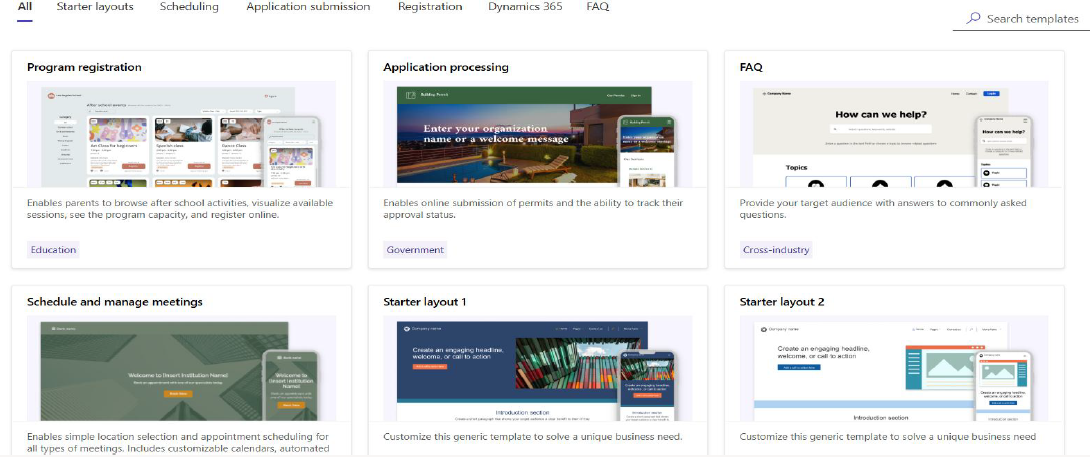
Starter Layout Templates
Starter layout templates provide the foundational building blocks to help you create custom sites.
- Available in multiple layout variations
- Include different images and color schemes
- Can be used as provided or customized to fit your needs
Blank Page Template
If you prefer complete control, you can start with a blank page template.
- Includes a home page with a header and footer
- Contains a single section for custom layout design
- Allows full flexibility to design your site exactly as needed
Solution Templates
Below are scenario-based templates designed to help you quickly build common types of sites:
| Template | Short Description |
|---|---|
| Program Registration | Shows features of a registration site suitable for any industry. |
| Frequently Asked Questions (Preview) | Structured FAQ site with no-code administrative content management. |
| Schedule and Manage Meetings | Demonstrates scheduling capabilities for appointment-based sites. |
| Application Processing | Shows features of an application submission site for any sector. |
Dynamics 365 Templates
If your environment includes Dynamics 365 applications, additional templates are available for your Power Pages sites.
- Dynamics 365 Sales
- Dynamics 365 Customer Service
- Dynamics 365 Field Service
- Dynamics 365 Marketing
- Dynamics 365 Project Operations
- Dynamics 365 Supply Chain Management
- Dynamics 365 Intelligent Order Management