Program registration template
Program Registration TemplateProgram Registration Template
Overview
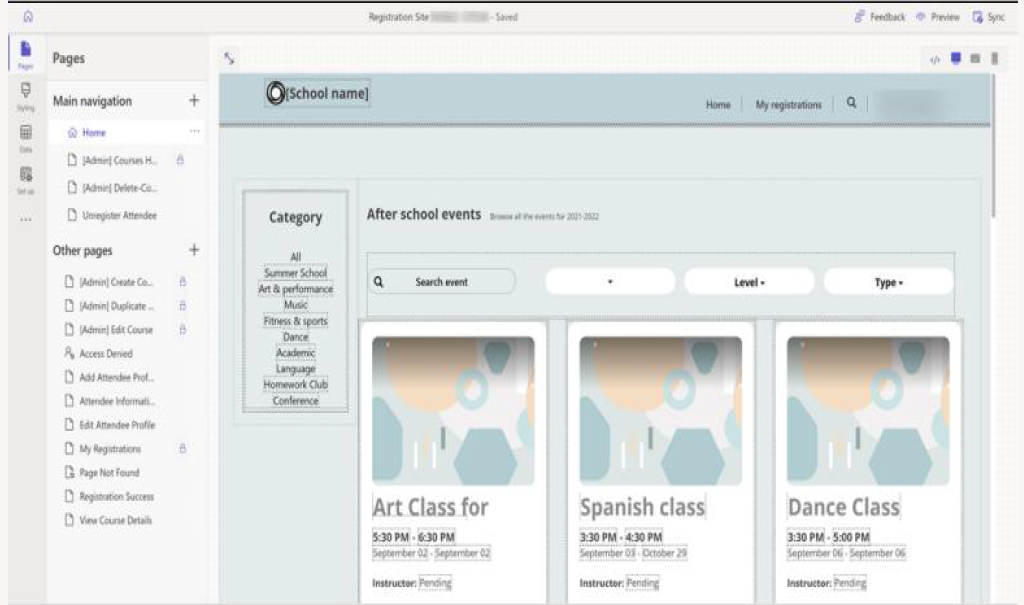
The Program Registration Template is designed to demonstrate the capabilities of a Power Pages–based registration website. The example scenario focuses on enrolling children in after-school programs, but this template can be adapted for any organization that needs an online registration solution.
Key Users
The template supports two primary user types:
-
Parents (Registrants)
- Browse and register their children for available after-school classes
- Modify an existing schedule
- Add or update attendee (child) information
- Receive class-related email notifications
-
School Representatives (Administrators)
- Manage and maintain the course catalog
- Add new courses or edit existing ones
- Customize the template using the Design Studio
Customer (Parent) Pages
| Page | Description |
|---|---|
| Home | Search for events and browse available courses based on filters. |
| Unregister Attendee | Remove a child from a previously registered class. |
| Add Attendee Profile | Create a new profile for a child. |
| Attendee Information | Enter a child’s details to complete their attendee profile. |
| My Registrations | View all registrations associated with a child’s profile. |
| Registration Success | Confirmation page displayed after successful registration. |
| View Course Details | Display details of the selected course. |
Admin (School Representative) Pages
| Page | Description |
|---|---|
| Courses Home | View a list of available courses with filtering options. |
| Create Course | Add a new course to the catalog. |
| Duplicate Course | Create a new course based on an existing course. |
| Delete Course | Remove a course from the catalog. |
| Edit Course | Modify the details of an existing course. |
Dataverse Tables and Forms
The template uses several basic forms connected to Dataverse tables. Makers can customize these forms as needed.
Forms Used in the Template
| Table Name | Table Form Name | Page Form Name | Description |
|---|---|---|---|
| Contact | Add child profile | Add Attendee | Used to create a child’s attendee profile. |
| msdynce_course | Portal Course Form ASP | Create Course | Used to create a course. |
| msdynce_course | Portal Course Form ASP | Edit Form | Used to edit an existing course. |
| msdynce_course | Delete a course form | Delete Course Form | Used to delete a course. |
| Contact | Edit child profile | Edit Attendee | Used to update a child’s profile. |
| msdynce_registration | Registration unregister form | Unregister Attendee | Used to remove an attendee from a course. |
Dataverse Tables Used
| Table Name | Schema Name | Description |
|---|---|---|
| Contact | contact | Stores contact and profile information for children. |
| Course | msdynce_course | Holds course details such as name, schedule, capacity, and status. |
| Registration | msdynce_registration | Stores registration details for each course enrollment. |
Customization and Development
The template includes custom code and follows modern UX guidelines. Developers can use the Microsoft Power Platform CLI and Visual Studio Code to extend and customize the site.