Public Preview: Access Your Power Apps Business Data Directly in Microsoft 365 Copilot
Microsoft has just crossed a major threshold in AI-powered productivity: your Power Apps model-driven apps can now surface directly inside Microsoft 365 Copilot—putting critical business data right where your users already work, without a single context switch. This is not a distant roadmap item. It is available in public preview today.
Think about the last time you needed business data mid-flow—building a PowerPoint presentation and needing the latest account details, or drafting a follow-up email and wanting to confirm a record before hitting send. You had to open a separate tab, navigate to the right view, find what you needed, and switch back. That unnecessary context switching kills momentum and costs time. That is the gap Microsoft is now closing.
Starting today in preview, users can engage their model-driven apps conversationally through Microsoft 365 Copilot—and makers gain a powerful new way to bring their app's value directly into the flow of work. The connection is made through your app's MCP (Model Context Protocol) server—a lightweight setup in Power Apps that is automatically created and configured for your model-driven app, registering it as an agent in Copilot and making its data available as conversational capabilities.
The experience is built around three core capabilities: out-of-the-box Grids and Forms available now, and Custom Tools coming soon. Here is what each one delivers.
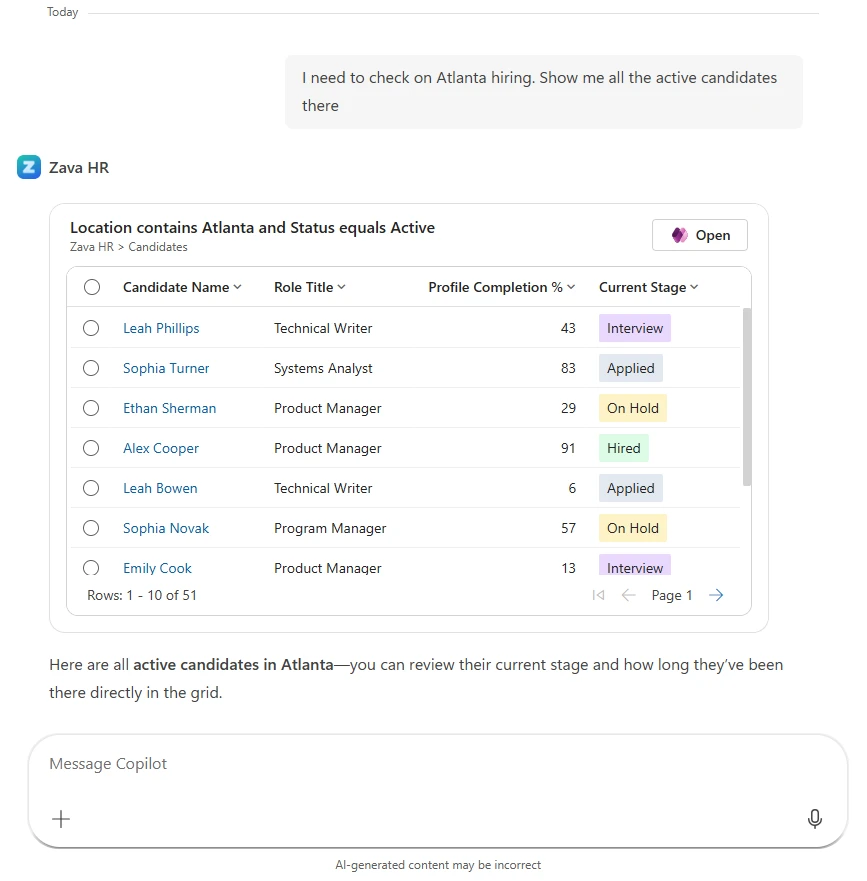
Grids — Explore Your Business Data Without Leaving the Conversation
Ask Copilot a natural language question about your business data—"Show me open accounts in the West region" or "Which cases were escalated this week?"—and it responds with an interactive grid drawn directly from your Power Apps data. Users can filter, sort, and scan records using the same views and permissions defined in the app itself, ensuring data governance is never compromised.
Selecting a record opens it inline, where users can review details, make edits, or keep the conversation going—asking follow-up questions, comparing records, or taking the next action without starting over. And when users need a full-screen experience, a deep link is always available—one click takes them directly to the relevant view or record in the full app, context fully preserved.
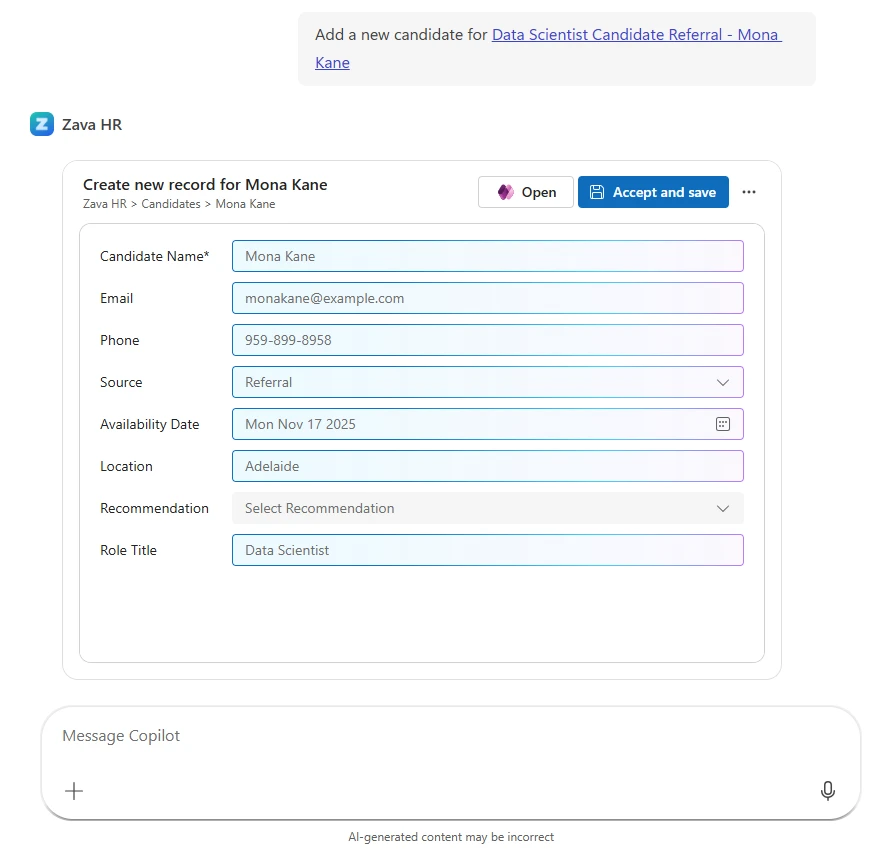
Forms — Create, View, and Update Records Without Leaving Copilot
Forms go well beyond read-only access. Users can create new records, view existing ones, or update fields—all directly inside Copilot. Imagine receiving a supplier email and asking Copilot to create a new account record from it, or reviewing a contract in Word and logging the key details into your CRM without switching apps. The workflow stays intact; the data gets captured.
Copilot surfaces the right form and, using the same underlying technology as the data entry agent in Power Apps model-driven apps, intelligently predicts field values based on the context at hand—reducing manual input and making data entry feel effortless. Less clicking. Less copying. More doing.
Available Across the Microsoft 365 Apps You Already Use
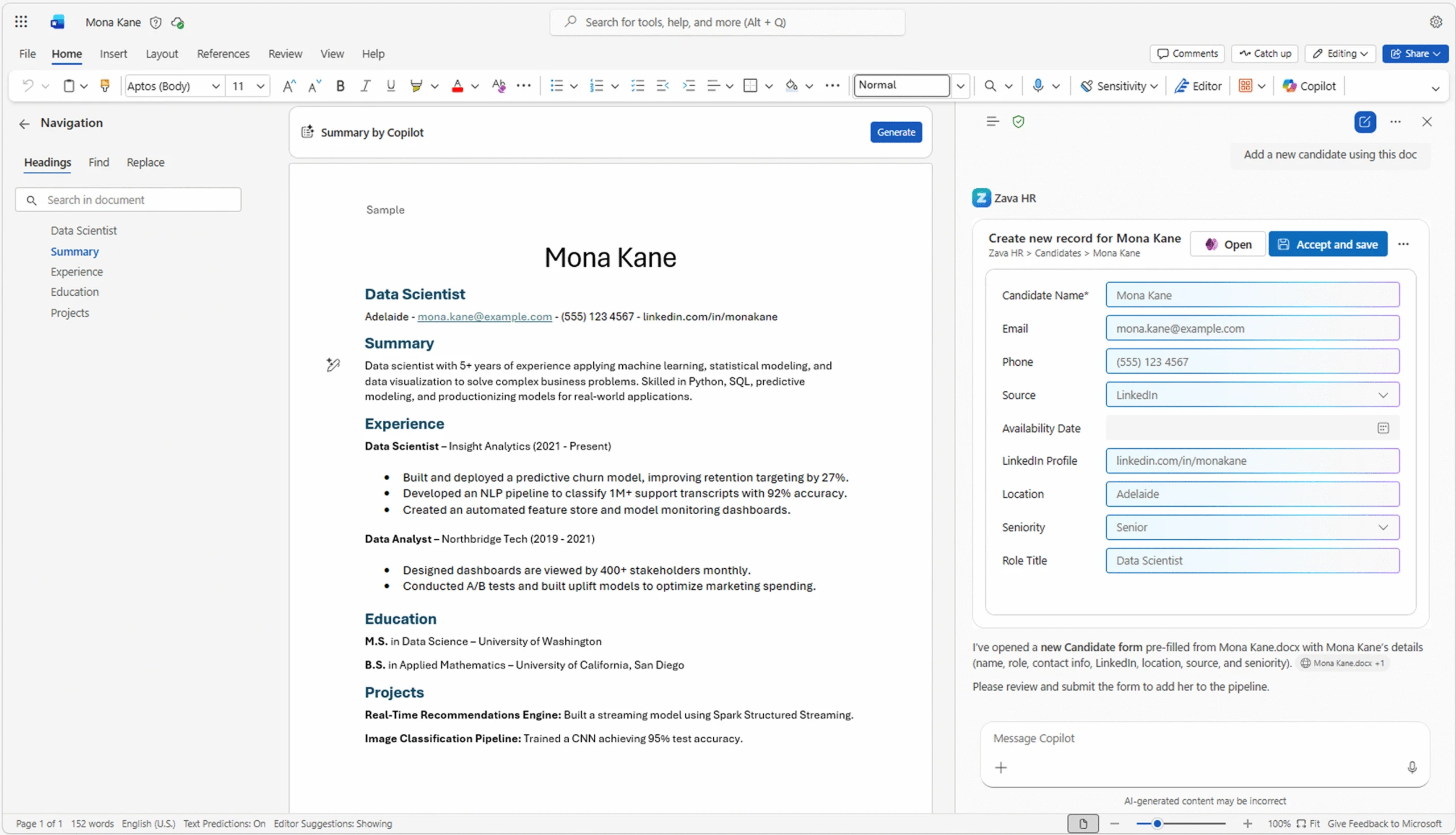
These capabilities are not limited to the standalone Copilot chat canvas. They are available across Copilot surfaces throughout Microsoft 365—Word, Excel, PowerPoint, Outlook, and more—so users can access and act on their business data right alongside the document, spreadsheet, or presentation they are working in.
Imagine drafting a proposal in Word, opening Copilot within the application, and creating a new account record with fields pre-filled from the document—without switching apps, without copying and pasting, without losing your train of thought. This is the kind of seamless, AI-powered workflow that transforms how teams operate day-to-day.
Need to go deeper? Both grids and forms include a deep link into the full model-driven app. One click takes users directly to the relevant record or view—no navigation required, no searching, full context preserved. It is not a disruptive context switch; it is a precise handoff to exactly where they need to be.
Custom Tools — Coming Soon
Beyond grids and forms, Custom Tools will allow makers to extend what Copilot can do with their model-driven apps—enabling purpose-built conversational actions tailored to specific business processes. This capability is on the near-term roadmap and will further expand what is possible when your apps live inside the flow of work.
What This Means for Your Organisation
This preview marks a meaningful shift in how Power Platform delivers business value. The line between your productivity tools and your business applications is blurring—intentionally. Organisations that embrace this integration early will see measurable gains in user adoption, data quality, and operational speed.
- Reduced context switching — Users stay in their flow of work, accessing and updating CRM and business data without app-hopping.
- Higher data quality — AI-assisted field prediction reduces manual entry errors at the point of capture.
- Faster onboarding — Conversational access lowers the learning curve for users unfamiliar with model-driven app navigation.
- Maker empowerment — Low-code makers can now extend their app's reach into Microsoft 365 with minimal additional configuration.
If you are building on the Power Platform or considering a Dynamics 365 implementation, this integration is a compelling reason to accelerate your investment. Our team at CRMONCE works hands-on with organisations to design and deploy Power Apps environments that are ready to take full advantage of capabilities like this.
Curious how this feature could work within your specific business processes? Get in touch with our team or explore our Power Platform consulting services to find out how we can help you get the most from this preview and the broader Microsoft Copilot ecosystem.
🚀 Ready to bring your Power Apps into Microsoft 365 Copilot?
Our certified Power Platform specialists can help you configure your MCP server, optimise your model-driven apps, and design workflows that take full advantage of this preview. Book a free discovery call today — or explore our Power Platform training programmes to upskill your team.