Schedule and manage meetings
Schedule and Manage Meetings TemplateSchedule and Manage Meetings
Template Summary
The Schedule and Manage Meetings template showcases how to build an online scheduling system. Although the example focuses on booking appointments with bank representatives, the same structure can be used by any organization that requires appointment scheduling.
1. Bank Customers
Customers can:
- Book an appointment with a representative by choosing the service, location, and available time.
- Cancel or reschedule appointments using links sent in their confirmation email.
2. Bank Representatives
Representatives can:
- View and manage their daily or weekly schedule.
- Create, edit, or cancel appointments.
- Block time for unavailability.
- Receive email notifications for appointment updates.
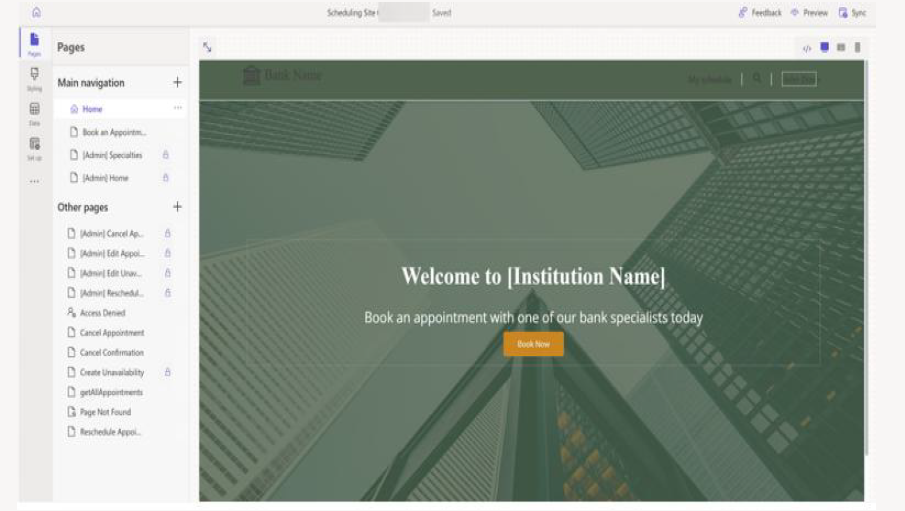
Customer Pages
| Page | Purpose |
|---|---|
| Home | Entry page with links to scheduling services. |
| Book Appointment | Multi-step booking process (service → location → availability). |
| Cancel Appointment | Cancel an existing booking. |
| Cancel Confirmation | Shows a successful cancellation. |
| Reschedule Appointment | Change a previously booked appointment. |
| Search | Keyword search for services. |
Representative Pages
| Page | Purpose |
|---|---|
| C1 Home | View appointment schedule by day or week. |
| Specialties | Set specialties customers can book for. |
| Cancel Appointment | Cancel customer appointments. |
| Edit Appointment | Edit appointment details. |
| Edit Unavailability | Adjust available hours. |
| Reschedule Appointment | Reschedule customer appointments. |
| Create Unavailability | Block calendar time. |
| Profile | View representative profile and specialties. |
| getAllAppointments | Retrieve the full appointment list. |
| Access Denied / Page Not Found | Error handling pages. |
Dataverse Tables & Forms
| Table | Schema | Description |
|---|---|---|
| Appointment | appointment | Appointment details for representatives. |
| Appointment Request | msdyn_appointmentrequest | Records appointment actions (create, cancel, edit). |
| Contact | contact | Bank representative information. |
| Feedback | feedback | Customer feedback form. |
| Account | account | Customer account details. |
Forms linked to these tables are used for booking, canceling, editing appointments, adding unavailability, uploading images, and managing specialties.