Set up and manage forums
Set Up & Manage Forums - Power PagesSet Up & Manage Forums
What is a Forum?
A forum is an online discussion platform that allows users to hold conversations through posted messages. Forums follow a hierarchical structure where a forum can contain multiple topics, also called threads.
Manage Forums in Power Pages
- Sign in to Power Pages
- Navigate to Community → Forums
- Select New to create a forum
- Select a forum name to edit
- Enter required details
- Click Save & Close
Manage Forums via Content Editor
- Navigate to the forum parent page on the website
- On the inline toolbar, select New
- Choose Child Forum
- Fill in the required fields
- Select Save
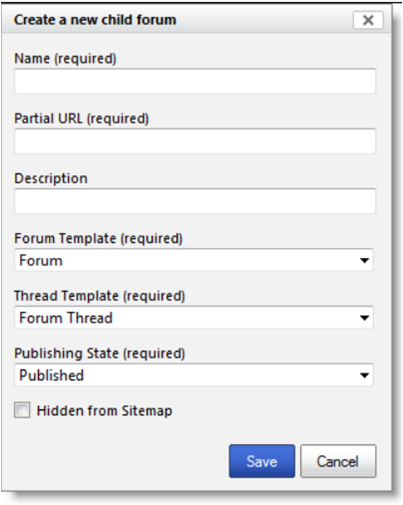
Key Forum Attributes
- Name – Forum title (required)
- Website – Site to which the forum belongs
- Parent Page – Hierarchy location
- Partial URL – Used for forum page URL
- Display Order – Position in the list
- Publishing State – Published/Draft visibility
- Hidden from Sitemap – Hidden from menus but accessible via URL
- Forum Page Template – Template for forum list page
- Thread Page Template – Template for thread pages
- Description – Forum information
- Thread Count / Post Count – Number of topics and posts
- Last Post – Latest activity
Additional Forum Management Features
- Create forum posts
- Moderate discussions
- Subscribe to alerts
Forum Attributes Used by Power Pages
- Name – Display name of the forum. Used as page title if no separate title is provided. Required.
- Website – The website where the forum belongs. Required.
- Parent Page – The parent webpage under which the forum appears in the hierarchy.
- Partial URL – URL segment for the page. Avoid special characters (?, #, !, %, /). Use letters, numbers, hyphens, or underscores only.
- Display Order – Number that decides the forum’s position in listings.
- Publishing State – Indicates Draft or Published mode and controls visibility.
- Hidden From Sitemap – Hides forum from navigation menus but remains accessible via direct URL.
- Forum Page Template – Template used to display the forum list page. Required.
- Thread Page Template – Template used to display individual forum threads. Required.
- Description – Brief details about the forum.
- Thread Count – Total number of threads.
- Post Count – Total number of posts.
- Last Post – Most recent forum activity.