Subscribe to alerts
Subscribe to Forum Alerts in Power PagesSubscribe to Alerts
Forum users can subscribe to specific threads to receive notifications whenever new posts are added. These alert settings are stored on the user’s Contact record, helping track engagement and interests.
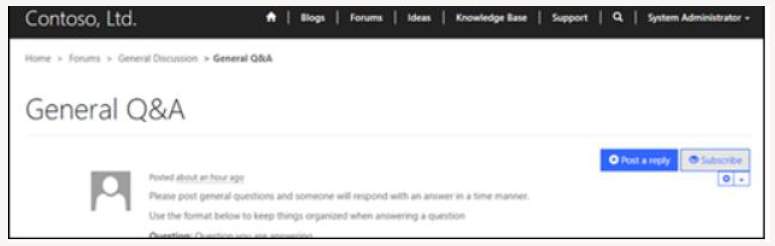
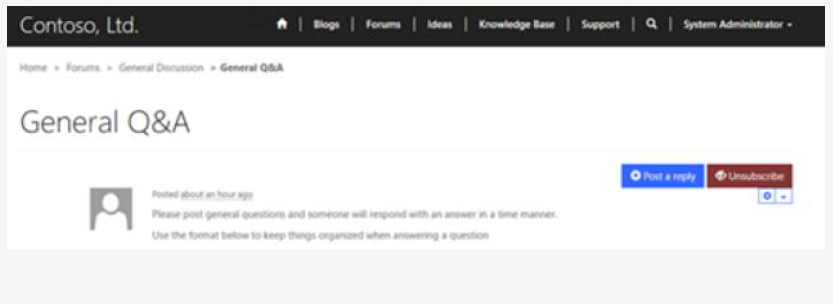
Depending on the page template used on the website, subscription and unsubscription options may appear differently.
Subscribe to Alerts
- Sign in to the site.
- Open the forum thread you want to follow.
- Select Subscribe or Alert Me.
Unsubscribe from Alerts
To stop receiving notifications for a forum thread:
- Sign in to the site.
- Navigate to the forum thread.
- Select Unsubscribe or Remove Alert.
Manage Forum Alerts in Power Pages
Although alerts are typically created through the website, administrators can also create, edit, or delete forum alerts directly in Power Pages.
Create a New Forum Alert
- Sign in to Power Pages.
- Navigate to Community → Forum Threads.
- Select a forum thread from the list.
- Open Forum Alerts from the left navigation.
- Select Add New Forum Alert.
- Fill in the required fields.
- Select Save & Close.
Edit an Existing Forum Alert
- Sign in to Power Pages.
- Navigate to Community → Forum Threads.
- Select a forum thread and open Forum Alerts.
- Select an existing alert.
- Update the required fields.
- Select Save & Close.
Forum Alert Attributes
| Field | Description |
|---|---|
| Subscriber | The Contact record of the user who will receive notifications. |
| Thread | The forum thread the user is subscribed to. |
| Expiration Date | The date and time when alert notifications should stop. |