What-if Analysis in Dynamics 365 Project Operations: Smarter Project Quoting Decisions in Real Time
Stop guessing. Start simulating. Make smarter, faster, and more confident project quote decisions—right where you work.
If you've ever lost sleep over a project quote, you're not alone. Project quoting demands a careful balance: aligning profitability with competitiveness, matching staffing strategies to delivery costs, and meeting customer expectations without sacrificing business outcomes. One wrong assumption can mean the difference between a winning bid and a costly loss.
Traditionally, evaluating these trade-offs has meant jumping between spreadsheets, manually recalculating numbers, and relying on gut instinct to guide critical decisions. It's time-consuming, error-prone, and frankly, stressful.
That's exactly why What-if Analysis (Preview) in Dynamics 365 Project Operations is such a game-changer.
This powerful new capability brings real-time simulation directly into your quoting workflow—so you can explore options, compare outcomes, and make decisions with complete clarity before finalizing a quote. No more guesswork. No more spreadsheet gymnastics. Just confident, data-backed decisions.
What Is What-if Analysis in Project Operations?
What-if Analysis introduces a dedicated simulation workspace within a project quote, allowing you to model changes to quantities and pricing and instantly see their financial impact—all without touching the live quote.
Instead of working through scenarios offline or in separate tools, you can now:
- Explore multiple pricing and staffing approaches within the quote itself
- Compare their financial outcomes side by side
- Apply the most effective scenario to the quote when you're ready
All without modifying the actual quote until you choose to. It's a more intuitive, controlled way to move from estimation to confident decision-making.
Turn Everyday Quoting Questions into Clear Answers
Every project quote involves tough questions that can make or break profitability:
- Should work shift to a lower-cost delivery center?
- What happens to our margin if billing rates increase for specific roles?
- Can we stay competitive while still protecting our bottom line?
With What-if Analysis, these are no longer hypothetical questions left to chance.
As you adjust quantities and pricing, the system instantly recalculates key financial metrics—including revenue, cost, gross margin, and budget variance—so you can clearly see the real-world impact of every change before committing to it.
This real-time feedback loop helps you move quickly from exploration to confident, data-backed decisions—reducing both risk and response time.
How What-if Analysis Works
Getting started is straightforward. From the What-if Analysis tab on a Draft quote, you can create a scenario based on the quote's existing data. Each scenario is fully isolated, allowing you to experiment freely without affecting the live quote.
Within the simulation workspace, you can adjust quantities and pricing across key dimensions such as resourcing unit, role, or any custom pricing dimension configured in your environment. Whether you're making high-level strategic adjustments or refining specifics at the quote line level, the experience is designed to be flexible and intuitive.
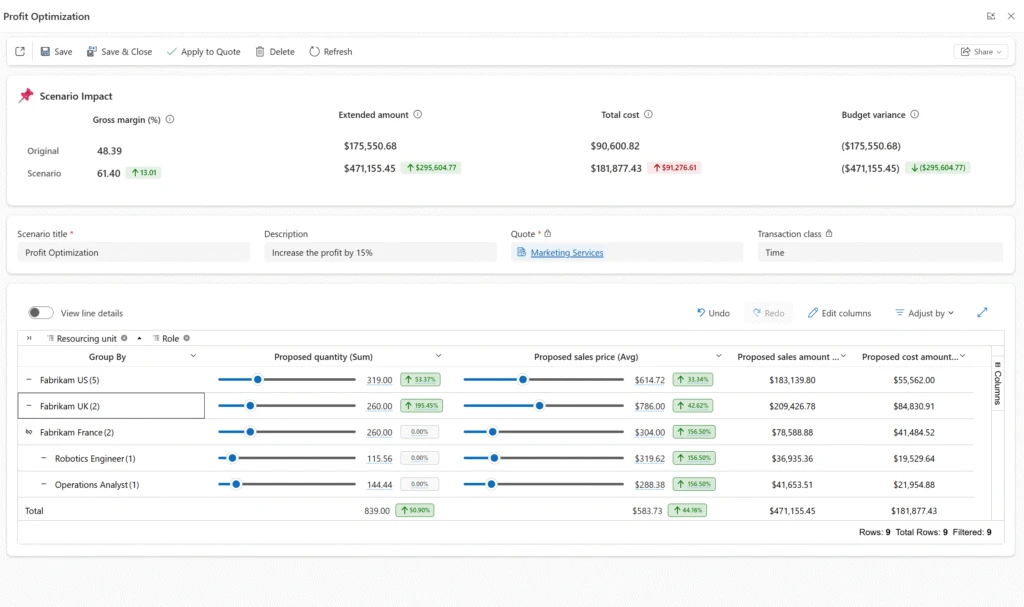
You can create multiple scenarios—each representing a different approach—and compare them side by side. Built-in comparison views highlight differences in financial outcomes, making trade-offs immediately visible and easier to evaluate.
When you've identified the best approach, applying the scenario updates the Draft quote in place—so you can move forward with confidence, without needing to create a new revision.
What This Means for Your Business
What-if Analysis fundamentally transforms how your team approaches project quoting—bringing clarity, speed, and confidence into every decision:
- Make decisions with confidence: Instantly understand how pricing and staffing changes affect revenue, cost, and margin—before you commit.
- Respond faster to client requests: Run scenarios in real time during negotiations, rather than going away to recalculate and follow up later.
- Protect profitability: Identify the pricing sweet spot that keeps you competitive without eroding your margins.
- Reduce quoting risk: Replace manual spreadsheet calculations with an auditable, integrated simulation tool built into your existing workflow.
- Collaborate more effectively: Share scenarios with stakeholders and align on the best approach before a quote is finalized.
For organizations already using Dynamics 365 Project Operations, this capability slots directly into your existing quoting process—no additional tools, no context switching, no disruption.
Getting Started with What-if Analysis
What-if Analysis is currently available as a Preview feature in Dynamics 365 Project Operations. To enable it, navigate to your feature management settings and activate the What-if Analysis preview. Once enabled, the dedicated tab will appear on all Draft quotes, ready to use.
If you're new to Project Operations or considering an implementation, our team can help you get up and running quickly. Explore our Dynamics 365 implementation services or consulting services to find the right approach for your organization.
Already using Project Operations and want to make the most of features like What-if Analysis? Our professional training programs can help your team unlock the full potential of the platform.
Ready to Transform Your Project Quoting Process?
What-if Analysis in Dynamics 365 Project Operations is more than a new feature—it's a smarter way to work. By bringing real-time financial simulation into your quoting workflow, it empowers your team to make better decisions, faster, with greater confidence.
Stop leaving money on the table with guesswork-driven quotes. Start simulating, comparing, and winning with What-if Analysis.
Want to see how What-if Analysis and Dynamics 365 Project Operations can work for your business? Get in touch with our team today and let's explore what's possible together.