Unlocking safer customer communications with Data Sensitivity Labels in Email
In regulated, data‑intensive industries, email is both a critical customer channel and one of the easiest ways sensitive information to leak — a single forward, distribution list, or broad recipient line can expose confidential data in seconds. Service teams need to move fast and keep strong controls in place.
Data Sensitivity Labels for Emails bring classification and protection directly into customer service workflows, so service representatives can work confidently without slowing down.
What they are
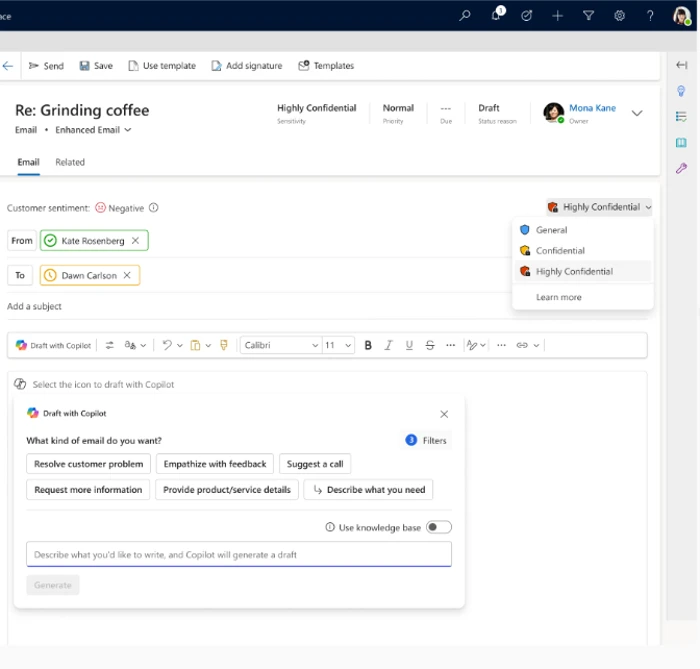
Data Sensitivity Labels classify outbound customer emails by the sensitivity of their content and apply the appropriate protection before sending. They’re powered by Microsoft Purview and align with your existing labels — Public, Confidential, Highly Confidential — so every email follows established security and compliance policies automatically.
How it works
A customer emails support to update banking details or share identity documents. As the service representative drafts the reply, Dynamics 365 surfaces the available Purview labels, making it easy to classify the email and apply the right protection before it goes out.
Once a label is applied (manually or automatically):
- The email is protected using the organization’s security settings
- External forwarding and unauthorized access are restricted
- The experience stays seamless for both the rep and the customer
Every sensitive interaction is governed by policy — not manual judgment.
Key capabilities
- Purview‑backed labels — reuses sensitivity labels already managed in Microsoft Purview
- In‑context guidance — labels are applied directly during email composition
- Consistent protection — encryption and access rules are enforced automatically
- Enterprise‑grade compliance — supports regulatory requirements across financial services, healthcare, and other regulated industries
The road ahead
This is a step toward compliance‑by‑default customer service, where data protection is embedded into the workflow rather than enforced after the fact. With Data Sensitivity Labels for Emails, organizations don’t have to choose between speed and safety. They get both.
Learn more
- Configure sensitivity labels for emails | Microsoft Learn
- Use sensitivity labels in emails | Microsoft Learn
The post Unlocking safer customer communications with Data Sensitivity Labels in Email appeared first on Microsoft Dynamics 365 Blog.
Source: This article is curated from Microsoft Dynamics 365 Blog. Visit the original post for more details and official documentation.