Use Power Pages action center
Use Power Pages Action CenterUse Power Pages Action Center
The Power Pages action center provides a centralized dashboard that helps admins and makers monitor insights, security recommendations, and key operational tasks directly from the Power Pages home page.
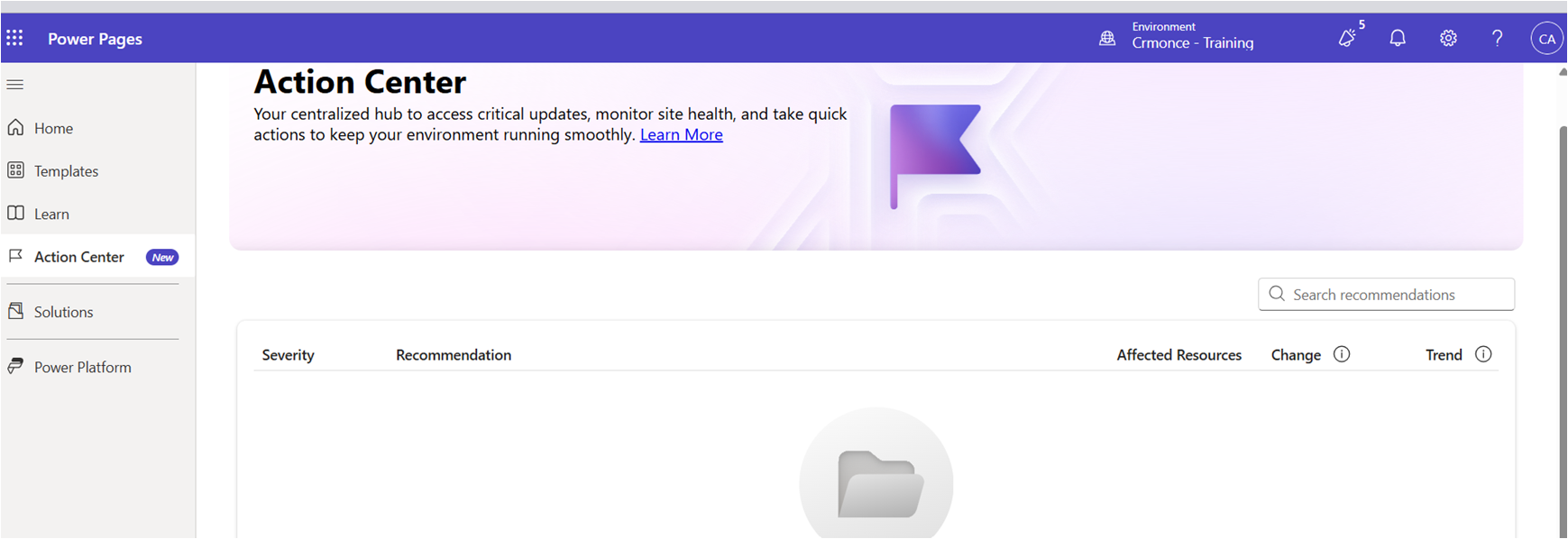
Access the Power Pages Action Center
- Choose your environment from the Power Pages home page.
- Select Action Center from the menu to open the dashboard.
Review Recommendations
The action center displays important recommendations that help maintain site performance and security:
Websites Expiring in the Next Seven Days
Shows trial websites set to expire within 7 days. Convert required sites to production.
Note: Updates may take up to one day to reflect.Websites with No Traffic in the Last 30 Days
Identifies websites that haven’t received visitors in 30 days.
To review:
- Select the recommendation to view site details.
- Go to Resources > Power Pages sites > Analytics for traffic information.
You may shut down unused sites and reactivate later if needed.
Websites Without CDN Enabled
Lists production sites where CDN is disabled. Enable CDN to improve performance.
Note: Removal from the list may take up to one day.Websites Without WAF Enabled
Shows sites without Web Application Firewall enabled. Turn WAF on for enhanced security.
Note: Changes may take up to one day to appear.Websites with Expired or Soon-to-Expire SSL Certificates
Displays SSL certificates that are expired or expiring within 90 days. Renew promptly.
Note: Updates can take up to one day.Websites Still Using Bootstrap Version 3
Indicates sites that haven't migrated to Bootstrap 5. Use the migration tool to upgrade.
Websites Using the Standard Data Model
Lists production sites that need to migrate to the enhanced data model using the site migration tool.
Take Actions
Makers can resolve many recommendations directly in the admin center or design studio. Some actions may require tenant admin permissions.
Share Recommendations
You can share recommendations through Microsoft Teams.
- Share full recommendations or selected rows using the Share to option.
- Shared items appear as adaptive cards in Teams chat.
- Cards include a direct link to the recommendation and related app, if applicable.
Access
The action center is available to users with environment-level permissions:
- Makers who build and manage sites
- System admins or environment admins
Some recommendations require elevated admin access.