Code Apps Architecture
Code Apps Architecture
- Power Apps Code Apps architecture defines how custom web applications are developed, published, and executed within the Microsoft Power Platform.
- It consists of multiple layers that work together across development, deployment, and runtime phases.
App Development
- An HTML or TypeScript/JavaScript application is a prerequisite for using Code Apps technology.
- Code Apps support Single-Page Applications (SPAs).
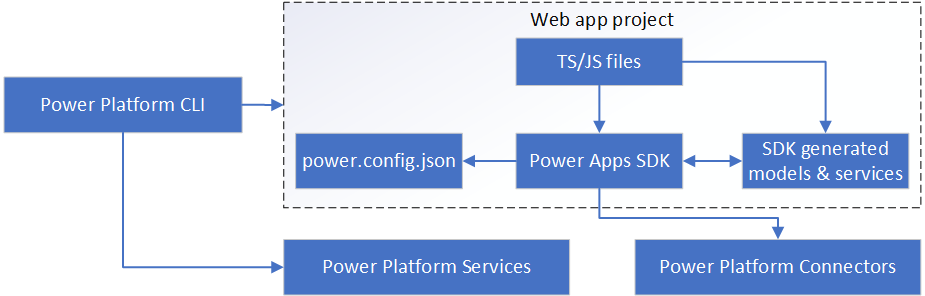
- The Power Platform CLI and Power Apps SDK enable applications to integrate with Power Platform connectors and be hosted within a Power Platform environment.
Development Components
- Power Apps SDK – Provides APIs and manages connector models and services.
- Generated models and services – Automatically created APIs for connector data access.
- power.config.json – Stores metadata used for configuration and publishing.
- Power Platform CLI – Publishes the compiled app to a Power Platform environment.
Runtime Architecture
At runtime, a Code App consists of the following components:
- Application code (HTML / TypeScript / JavaScript)
- Power Apps SDK
- Power Apps Host
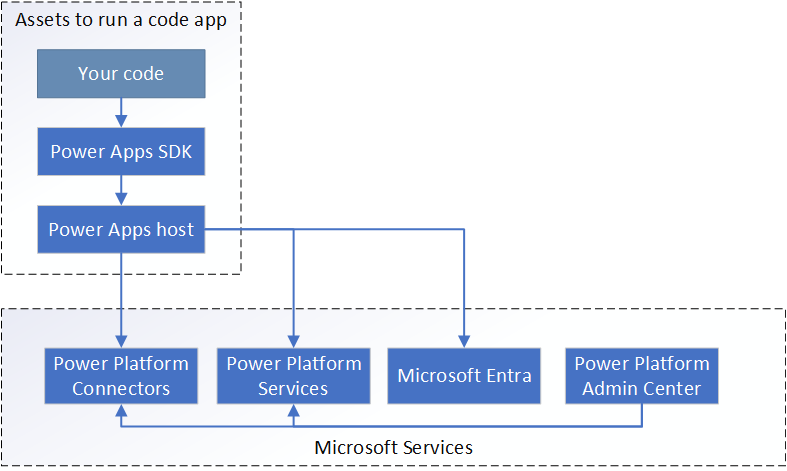
- Power Apps SDK – Provides APIs to access data through connectors using generated models.
- Power Apps Host – Manages authentication, application loading, and error handling.
Architecture Considerations
- Layered Architecture – Ensures secure execution and seamless Power Platform integration.
- System Configuration – Contains Code App configuration details; preview features are intended for evaluation only and not for production use.
- Hosted App Code – Published Code Apps are hosted on a public endpoint. Sensitive data must be stored in secure data sources and accessed only after user authentication.
Hide App Header
- You can hide the Power Apps header during playback by appending ?hideNavBar=true to the app URL.
-
Before: Header is visible
https://apps.powerapps.com/play/e/{environment-id}/a/{app-id} -
After: Header is hidden
https://apps.powerapps.com/play/e/{environment-id}/a/{app-id}?hideNavBar=true